Another exciting feature that would come with TFS 2013, is Team Rooms for Team collaboration. It is already available in Team Foundation Service even though it is not 100% working (of course as expected in a preview).
This will be one of new features added to Team Web Access for team collaboration. Team members can create separate rooms - say Developer Room, QA Room, Common Room etc for their team project. team members can chat on the rooms, include hyperlinks to work items (with #WorkitemId like #7050). Events can be configured to appear in the rooms, based on different events that may happen as the project activities go on. For example when a code review requested or even when work item changed you can configure to create an event in the room.
Here are few screen shots taken from Team Foundation Service for you to have a glimpse on what is going to come as Team Rooms with TFS 2013.
1. Entry point to team rooms as of now.
2. Have a chat
3.Create a new room
4. Add members to the room
5. Manage events in the room
For further details refer http://msdn.microsoft.com/en-us/library/vstudio/dn169471(v=vs.120).aspx
Await for more new features with TFS 2013... :)
Wednesday, 10 July 2013
Tuesday, 9 July 2013
TFS 2013 - Web Access - MSF Agile - Backlog & Board
Lets have a quick look at few cool stuff that will be available with TFS 2013 in MSF Agile Template. With this release Microsoft added Feature work item representing a Feature that is implemented with many user stories. They have made the Backlog and the Board appearance consistent across Web Access Work tab.
Vertical color bars to denote different types of work items, giving a great look to the Board and the Backlog.
1. Feature Backlog
2. Feature Backlog - with User Stories
3. Feature Backlog - with User Stories & Tasks
4. Ease of Access
5. Feature Board
6. Stories
7. Stories to Features
8. Stories to Tasks
9. Stories Board
10. Iteration Backlog
11. Iteration Board - Grouped by Stories
12. Iteration Board - Grouped byPeople
13. Queries
Cool stuff...greater consistency...and await for more... as I explore in the coming weeks...
Vertical color bars to denote different types of work items, giving a great look to the Board and the Backlog.
1. Feature Backlog
2. Feature Backlog - with User Stories
4. Ease of Access
5. Feature Board
6. Stories
7. Stories to Features
8. Stories to Tasks
9. Stories Board
10. Iteration Backlog
11. Iteration Board - Grouped by Stories
12. Iteration Board - Grouped byPeople
13. Queries
Cool stuff...greater consistency...and await for more... as I explore in the coming weeks...
Sunday, 7 July 2013
Tips on Install TFS 2012
Here are few quick tips on installing and configuring Team Foundation Server 2012 with SharePoint Foundation 2013 and SQL Server 2012.
This tips are valid for Windows Server 2008 R2 SP1 and Windows Server 2012.
1. Install OS and add you server to domain.
2. Make sure you have following accounts ready.
3. Grant log on as Service and allow log on locally permissions by
This tips are valid for Windows Server 2008 R2 SP1 and Windows Server 2012.
1. Install OS and add you server to domain.
2. Make sure you have following accounts ready.
- TFS Admin - This should be a domain user account who is installing configuring and administering the TFS server. Add this user to the administrator group of your TFS server.
- TFS Service -TFS Service account. This account must have the Log on as a service permission.
- TFS Build - This account must have the Log on as a service permission.
- TFS Sharepoint Service - Service Account For SharePoint
- TFS Sql Service - Sql Service Account for TFS.
- TFS Reports - Report Reader account for TFS. This account must have allow log on locally permission.
3. Grant log on as Service and allow log on locally permissions by
- Point to Control Panel, point to Administrative Tools, and then double-click Local Security Policy.
- In the console tree, double-click Local Policies, and then click User Rights Assignment.
- In the details pane, double-click Log on as a service/Allow log on locally.
- Click Add User or Group, and then add the appropriate account to the list of accounts that possess the Log on as a service/Allow log on locally right.
4.Install Web Server IIS role (http://www.iis.net/learn/web-hosting/web-server-for-shared-hosting/installing-the-web-server-role)
5. Install SQL server 2012 and provide the service account as TFS Sql Service
- Make sure to install reporting services in native mode as well since it is much easier to do that way.
- Make sure to install as Prerequisites first. If you want to do the instillation of prerequisites in offline mode follow this post. http://blogs.technet.com/b/meamcs/archive/2012/12/26/install-and-download-sharepoint-2013-prerequisites-offline-manually.aspx
- When configuring do it as complete. Follow this post for further information.http://nakedalm.com/integrate-sharepoint-2013-with-team-foundation-server-2012/
Wednesday, 12 June 2013
TFS 2012 Email Alerts with Gmail Account
In my recent ALM session @ .Net user group, Sri Lanka, there were few queries on setting up TFS email with a Gmail account. For those folks and all others who would like to setup email alerts with a gmail account, there are two simple steps to do.
1. Enable POP in Gmail.
Goto --> Your Gmail account --> Settings --> Forwarding and POP/IMAP and set the settings as below. (Set to enable POP for emails from now on and after save you should see POP is enabled)
2.Setup Gmail account settings as Email Alert settings in TFS 2012.
Open Team Foundation Administration Console --> Application Tier --> Alert Setting
and set the settings as below example. It should be your Gmail account and password :)
And now all is setup and your TFS users can subscribe for alerts in TFS 2012 and will get an email from your TFS Gmail account that you set in above.
1. Enable POP in Gmail.
Goto --> Your Gmail account --> Settings --> Forwarding and POP/IMAP and set the settings as below. (Set to enable POP for emails from now on and after save you should see POP is enabled)
2.Setup Gmail account settings as Email Alert settings in TFS 2012.
Open Team Foundation Administration Console --> Application Tier --> Alert Setting
and set the settings as below example. It should be your Gmail account and password :)
And now all is setup and your TFS users can subscribe for alerts in TFS 2012 and will get an email from your TFS Gmail account that you set in above.
Wednesday, 8 May 2013
Why CI Build
There is lot of talk on CI builds nowadays. Have you ever thought why it has become a hot topic? Or is it really important? What is the benefit of it? OK to answer all above I will take you through a very simple demo with even simpler sample.
For simplicity let's say we only have two developers in our team. The Developer A and the Developer B. They both are working on a windows forms application referring to a class library from that.
Our Developer A starts development and he creates a method "GetWelcomeMessage" in Class1. Then he uses it in his Form1 he is developing in the Windows Application.
Developer A compiles this code successfully and checks-in the Class1 and Form1. Now the source control server (TFS) has the files as below.
Now our Developer B takes the latest version from source control server and he adds another form, Form2 and use the method developed by Developer A.
Developer B compiles his code successfully in his development PC and checks-in the code. Now the server copy will be like below.
The source control server (TFS) now have the code checked-in by both Developer A and Developer B. This source code is valid and compiles without any issue if latest version is downloaded to any of the developers' PCs.
Now our Developer A becomes a little bit lazy next day morning and do not bother to get the latest version from the server. So he still has only Form1 and the Class1 in his solution.
Developer A starts modifying code from yesterday WITHOUT getting the latest version from source control server. He changes Class1 "GetWelcomeMessage" method to accept a parameter (username) and include that in the return message. Then he modifies the Form1 method call to Class1."GetWelcomeMessage" to send the username.
The Developer A compiles the code in his development PC, and it looks good and compiles successfully. Developer A checks-in the modified Class1 and Form1 code to the source control server(TFS).
Now what is the status of the code in source control server. The Developer A has checked-in set of changes which is causing build errors in the solutions latest copy in the source control server.
Now if developer A or B download the latest version from source control server, none of them will be able to compile the solution. If both of them lazy enough to not to get the latest version, they will keep on developing and adding new files for their respective tasks without knowing about the errors in the latest copy of the solution. May be they will discover this just before, when they try to release to QA.
Wouldn't it be nice to have someone who compiles the source code checked-in to the Source Control Server (TFS) and alert the two Developers A,B about the broken build status, and the changes that caused the build break.
Exactly that is the job of a CI build in TFS world. CI build will build the Source Control Server version of the source code for each checked-in, change-set and alert if there is any build failures. This will give lot of benefit to the developers to easily identify the issue in the build by detecting the change-set caused the build break.
In my next post I will explain how to setup a CI build , for a solution with TFS 2012 & VS 2012.
For simplicity let's say we only have two developers in our team. The Developer A and the Developer B. They both are working on a windows forms application referring to a class library from that.
Our Developer A starts development and he creates a method "GetWelcomeMessage" in Class1. Then he uses it in his Form1 he is developing in the Windows Application.
Developer A compiles this code successfully and checks-in the Class1 and Form1. Now the source control server (TFS) has the files as below.
Now our Developer B takes the latest version from source control server and he adds another form, Form2 and use the method developed by Developer A.
Developer B compiles his code successfully in his development PC and checks-in the code. Now the server copy will be like below.
The source control server (TFS) now have the code checked-in by both Developer A and Developer B. This source code is valid and compiles without any issue if latest version is downloaded to any of the developers' PCs.
Now our Developer A becomes a little bit lazy next day morning and do not bother to get the latest version from the server. So he still has only Form1 and the Class1 in his solution.
Developer A starts modifying code from yesterday WITHOUT getting the latest version from source control server. He changes Class1 "GetWelcomeMessage" method to accept a parameter (username) and include that in the return message. Then he modifies the Form1 method call to Class1."GetWelcomeMessage" to send the username.
The Developer A compiles the code in his development PC, and it looks good and compiles successfully. Developer A checks-in the modified Class1 and Form1 code to the source control server(TFS).
Now what is the status of the code in source control server. The Developer A has checked-in set of changes which is causing build errors in the solutions latest copy in the source control server.
Now if developer A or B download the latest version from source control server, none of them will be able to compile the solution. If both of them lazy enough to not to get the latest version, they will keep on developing and adding new files for their respective tasks without knowing about the errors in the latest copy of the solution. May be they will discover this just before, when they try to release to QA.
Wouldn't it be nice to have someone who compiles the source code checked-in to the Source Control Server (TFS) and alert the two Developers A,B about the broken build status, and the changes that caused the build break.
Exactly that is the job of a CI build in TFS world. CI build will build the Source Control Server version of the source code for each checked-in, change-set and alert if there is any build failures. This will give lot of benefit to the developers to easily identify the issue in the build by detecting the change-set caused the build break.
In my next post I will explain how to setup a CI build , for a solution with TFS 2012 & VS 2012.
Wednesday, 17 April 2013
Code Review with TFS 2012 and VS 2012
Let's have a look at another cool feature comes along with VS 2012 and TFS 2012. There is traceability and visibility of entire code review process with this new feature. It is very easy to use as well.
I will explain everything related to code reviews with a very simple example. I have simple button click which assigns a text to a text box in my form. I want my supervisor to do a code review on this great implementation that I have done before I check in my source code. So I got to Team Explorer --> My Work and request a code review.
I can choose who would do the code review.It can be more than one person. I enter a title for the code review and a description if I want. When I submit my request VS 2012 associates all code files I have changed or newly added (my all pending changes) to the code review request. Behind the scene what happens is my pending changes are shelved and that shelve-set is associated automatically to the Core Review Request TFS work item.
It is possible to submit already checked in change-set to code review as well. Simply right click on change-set and request a code review.
The supervisor(s) will see the code review request on his My Work. He has the
option to accept or decline the request.
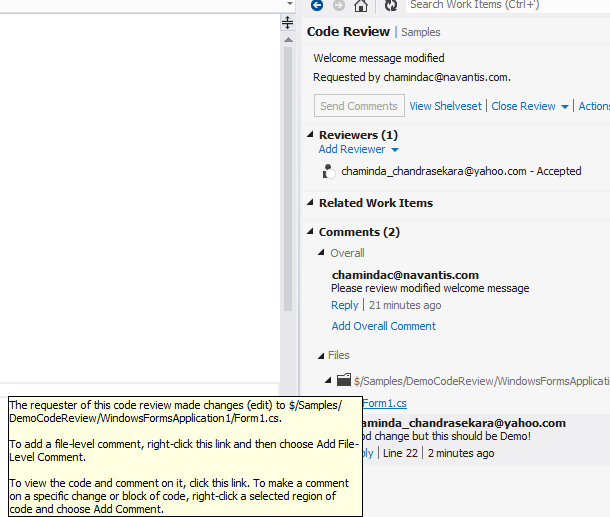
Reviewer can view the changes done and can comment as overall comment or comment on files or even add comment highlighting the code sections.
Reviewer can mark each individual file as reviewed to keep track of his own activities.
He can add comments and save them. The comments will only be seen by the other party when he send them.
Once reviewer send the code review comment or finishes the code review I can see it in My Work and close the code review request.
I can do changes on my supervisors recommendations and mark them as done to keep track, and create a new code review request if I want. This time my old code review is automatically linked with new code review. Like all other work items in TFS world, history is recorded for Code Reviews and you can review your code reviews.
Great stuff..isn't it? VS 2012/ TFS 2012 rocks with these new cool features.
I will explain everything related to code reviews with a very simple example. I have simple button click which assigns a text to a text box in my form. I want my supervisor to do a code review on this great implementation that I have done before I check in my source code. So I got to Team Explorer --> My Work and request a code review.
I can choose who would do the code review.It can be more than one person. I enter a title for the code review and a description if I want. When I submit my request VS 2012 associates all code files I have changed or newly added (my all pending changes) to the code review request. Behind the scene what happens is my pending changes are shelved and that shelve-set is associated automatically to the Core Review Request TFS work item.
It is possible to submit already checked in change-set to code review as well. Simply right click on change-set and request a code review.
The supervisor(s) will see the code review request on his My Work. He has the
option to accept or decline the request.
Reviewer can view the changes done and can comment as overall comment or comment on files or even add comment highlighting the code sections.
Reviewer can mark each individual file as reviewed to keep track of his own activities.
He can add comments and save them. The comments will only be seen by the other party when he send them.
Once reviewer send the code review comment or finishes the code review I can see it in My Work and close the code review request.
I can do changes on my supervisors recommendations and mark them as done to keep track, and create a new code review request if I want. This time my old code review is automatically linked with new code review. Like all other work items in TFS world, history is recorded for Code Reviews and you can review your code reviews.
Great stuff..isn't it? VS 2012/ TFS 2012 rocks with these new cool features.
Thursday, 21 February 2013
Use TFS 2012 with Visual Studio 2008/2010 and Business Intelligence Development Studio(BIDS) 2008 R2
ll of you know that it is very easy to connect VS 2012 with TFS 2012. Ok..Here goes few questions...
1. Can you use TFS 2012 with VS 2010? or VS 2008?
2. Is it possible to connect BIDS 2008 (Business Intelligence Development Studio) installed with 2008 SQL Server R2 with TFS 2012? Can you develop your SSIS packages or SSRS Reports in BIDS 2008 using source control with TFS2012?
Answer for all above is YES, YES, YES...and YES. let me show you how?
VS 2008/BIDS 2008 with TFS 2012
1. Download and install VS 2008 Team explorer from here.
2. Make sure you have installed SP1 for Visual Studio 2008. if not download and install it from here.
3. Download and install the TFS 2012 Compatibility GDR(General Distribution Release) for VS 2008 from here.
4. Go ahead and add your TFS 2012 server (REMEMBER you have to give project collection) to VS 2008/BIDS 2008 Team Explorer.
Below screenshots show connecting TFS 2012 Online Service with BIDS 2008.
Connecting giving project collection name
Authentication
Project Collection connected
VS 2010 with TFS 2012
1. Make sure you have installed SP1 for Visual Studio 2010. if not download and install it from here.
2. Download and install the TFS 2012 Compatibility GDR(General Distribution Release) for VS 2010 from here.
3. Go ahead and add your TFS 2012 server to VS 2010 Team Explorer
It is much easier with VS 2010. You can connect and select the Project Collection you want.
1. Can you use TFS 2012 with VS 2010? or VS 2008?
2. Is it possible to connect BIDS 2008 (Business Intelligence Development Studio) installed with 2008 SQL Server R2 with TFS 2012? Can you develop your SSIS packages or SSRS Reports in BIDS 2008 using source control with TFS2012?
Answer for all above is YES, YES, YES...and YES. let me show you how?
VS 2008/BIDS 2008 with TFS 2012
1. Download and install VS 2008 Team explorer from here.
2. Make sure you have installed SP1 for Visual Studio 2008. if not download and install it from here.
3. Download and install the TFS 2012 Compatibility GDR(General Distribution Release) for VS 2008 from here.
4. Go ahead and add your TFS 2012 server (REMEMBER you have to give project collection) to VS 2008/BIDS 2008 Team Explorer.
Below screenshots show connecting TFS 2012 Online Service with BIDS 2008.
Connecting giving project collection name
Authentication
Project Collection connected
VS 2010 with TFS 2012
1. Make sure you have installed SP1 for Visual Studio 2010. if not download and install it from here.
2. Download and install the TFS 2012 Compatibility GDR(General Distribution Release) for VS 2010 from here.
3. Go ahead and add your TFS 2012 server to VS 2010 Team Explorer
It is much easier with VS 2010. You can connect and select the Project Collection you want.
Tuesday, 19 February 2013
Set up TFS 2012 on Windows Server 2008 R2 - A quick guide to installation
After a year long break I thought of writing on ALM again. I am going to give set of steps to install TFS 2012 on a Single server. You can use TFS2012 on cloud with visualstudio.com, but installing/configuring it will give you a good experience and in depth knowledge. Anyone planing to take MS certification exam for Administering Visual Studio Team Foundation Server 2012 will have a definite advantage when you do all by yourself.
So lets start,
1. Install Win 2008R2
2. Change computer name and Setup as PDC or Add to existing domain - It is useful to configure your own domain if you are trying out in a VPC for learning purpose.
3. Install Web Server(IIS) Role with ASP.net and Basic Authentication
4. Install SQL 2012 Standard/Enterprise or developer (Express is not having Analysis Services/Reporting Services)
5. Install Sharepoint Foundation 2010 -- REMEMBER --> Do not configure now
6. Install Sharepoint Foundation 2010 SP1 -- Configure Sharepoint..Add TFS service account to Farm Administrators group of sharepoint...Create default team site
7. Install TFS 2012
8. Configure TFS 2012 in Advanced Mode, make sure to select the installed Sharepoint Foundation 2010 in the sharepoint configuration step.
Above is brief but that's all you need. Additionally you can install MS office/MS project to have a better ALM experience integrated with TFS 2012.
If you need more info or help...contact me.. :)
I hope to discuss more details on ALM with VS 2012 & TFS 2012 in coming weeks...
So lets start,
1. Install Win 2008R2
2. Change computer name and Setup as PDC or Add to existing domain - It is useful to configure your own domain if you are trying out in a VPC for learning purpose.
3. Install Web Server(IIS) Role with ASP.net and Basic Authentication
4. Install SQL 2012 Standard/Enterprise or developer (Express is not having Analysis Services/Reporting Services)
5. Install Sharepoint Foundation 2010 -- REMEMBER --> Do not configure now
6. Install Sharepoint Foundation 2010 SP1 -- Configure Sharepoint..Add TFS service account to Farm Administrators group of sharepoint...Create default team site
7. Install TFS 2012
8. Configure TFS 2012 in Advanced Mode, make sure to select the installed Sharepoint Foundation 2010 in the sharepoint configuration step.
Above is brief but that's all you need. Additionally you can install MS office/MS project to have a better ALM experience integrated with TFS 2012.
If you need more info or help...contact me.. :)
I hope to discuss more details on ALM with VS 2012 & TFS 2012 in coming weeks...
Subscribe to:
Comments (Atom)
Popular Posts
-
As we discusssed in " Setup Redis Cluster with JSON and Search Modules on AKS with Binami Redis Using Custom Image " the cluster...
-
We have discueed, that we have to use an environment variable to handle input parameter default values, if we are using trigger for workflo...
-
Pull Request are the controlled way to bring in the changes to your stable branches in your Azure Git repos, or for that matter all Git prov...
-
Can a Coded UI test executed with a Console Application? Yes it is possible. I am going to explain how it can be done. I am going to exec...
-
Sometimes you may need to edit files especially the web.config or appsettings.json files after deploying your application to Azure App Servi...


