It is now possible to change the work item icons in on premises TFS 2017.2 and in VSTS. This is a cool feature allowing you to, recognize the type of work item at a glance. However there is a significant difference between TFS and VSTS how you apply this change. Let’s explore how we can change icon for existing and any new tem projects in both TFS 2017.2 (works just same in TFS 2018 RC1) and in VSTS.
Showing posts with label customization. Show all posts
Showing posts with label customization. Show all posts
Thursday, 14 September 2017

Thursday, 22 June 2017
Team Services Process Customization
Team Services is coming up with many improvements and one of it is the new process customization experience introduced recently. This allows you to have your own custom work item types, custom work item state flows and custom fields for work items etc. It is made easier to start customizing even directly from work item form. Let’s look at and understand process customization options available for you to optimize your work process.
Saturday, 13 December 2014
Show/Hide Work Item Field Based on Value in Another Field
Is it possible? To show/hide work item field based on value in another field. Answer is yes and no. Let me show you why and how.
Let’s create a condition field with two options

Next we’ll create a second field which is using WHEN condition with READONLY is the vale in condition field is NotEditable.
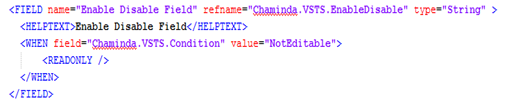
Add the two fields to Form like below and we’ll see how it works

When the second field is having no value (empty) then it is hidden when selected “NotEditable” in condition field and shows when it is selected “Editable” in condition field.

When you have a value in the second field it is set to readonly and editable mode instead of hide and show.

If you want to handle multiple values in condition field, and some of them set the second field show-hide/readonly-editable you can do it as shown below.
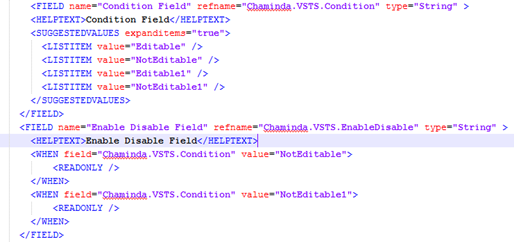
Let’s create a condition field with two options

Next we’ll create a second field which is using WHEN condition with READONLY is the vale in condition field is NotEditable.

Add the two fields to Form like below and we’ll see how it works

When the second field is having no value (empty) then it is hidden when selected “NotEditable” in condition field and shows when it is selected “Editable” in condition field.

When you have a value in the second field it is set to readonly and editable mode instead of hide and show.

If you want to handle multiple values in condition field, and some of them set the second field show-hide/readonly-editable you can do it as shown below.

Subscribe to:
Posts (Atom)
Popular Posts
-
 Let’s look at how we can specify the artifact version to download based on the resource CI build linked to the CD pipeline and check on how ...
 -
 The hosts file in /etc/hosts is allowing the WSL distros to map IP addresses to domain names before going to domain name servers, similar...
 -
 Can a Coded UI test executed with a Console Application? Yes it is possible. I am going to explain how it can be done. I am going to exec...
 -
Pull Request are the controlled way to bring in the changes to your stable branches in your Azure Git repos, or for that matter all Git prov...
-
The new Azure Managed Redis can be deployed with balanced compute and memory with high availability, and useful modules such as RedisJson a...

