From TFS 2015 it was possible to create Team Projects for on premises TFS, using the web interface. But when you create a team project from web interface it does not create Reporting Services or SharePoint integrations. With TFS 2018, SharePoint server integration has been removed and if you want to integrate with SharePoint, setup your SharePoint site using the SharePoint’s own interface. However, Reporting Services is still in use with TFS 2018, and integration to Reporting Services gets created when a Team Project created via Visual Studio (you can use VS 2017 to create a Team Project in TFS 2018 RC1). A Team Project created with web interface will not have a Reporting Services integrated and let’s look at how to create that integration using command line.
Showing posts with label reports. Show all posts
Showing posts with label reports. Show all posts
Friday, 8 September 2017

Friday, 22 May 2015
Resolve - TF255050: A connection cannot be made to the Report Server WMI provider
When setting up reporting services in a remote server for TFS below error might occur.
*******************************************************************************************************
TF255050: A connection cannot be made to the Report Server WMI provider. Verify the following:
1. You have entered the correct name for the server, including the instance name.
2. The Windows Management Instrumentation service is running on tfsssrs.
3. The service is not blocked by Windows Firewall.
4. You have the required permissions to connect.
Details:
The RPC server is unavailable. (Exception from HRESULT: 0x800706BA)
*******************************************************************************************************
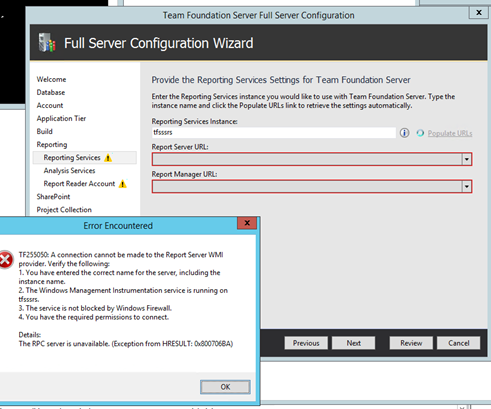
Verify reporting services running and all ports as specified in the “Ports required for installation of Team Foundation Server” are open.


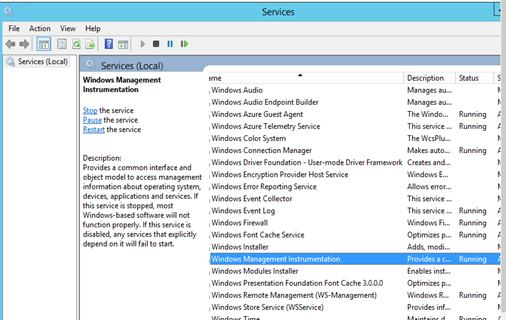
WMI Service is running in report server.
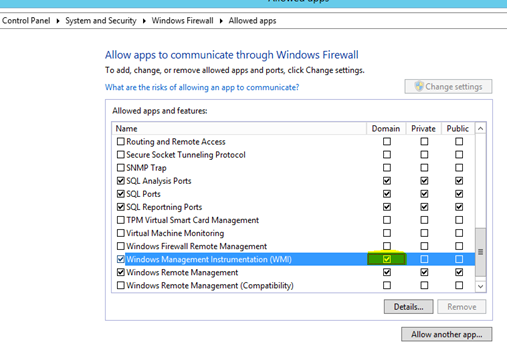
WMI Service is allowed in Firewall of the report server.
Report server URLs populated after all above set.

*******************************************************************************************************
TF255050: A connection cannot be made to the Report Server WMI provider. Verify the following:
1. You have entered the correct name for the server, including the instance name.
2. The Windows Management Instrumentation service is running on tfsssrs.
3. The service is not blocked by Windows Firewall.
4. You have the required permissions to connect.
Details:
The RPC server is unavailable. (Exception from HRESULT: 0x800706BA)
*******************************************************************************************************

Verify reporting services running and all ports as specified in the “Ports required for installation of Team Foundation Server” are open.


WMI Service is running in report server.

WMI Service is allowed in Firewall of the report server.

Report server URLs populated after all above set.

Monday, 18 May 2015
Enable Excel Reports for Team Project When SSRS Configured Later for TFS
If the TFS server is setup and the reporting services are not configured, the newly created team projects will not have excel reports enabled in SharePoint project portal.

Once the TFS is configured with SSRS the Excel reports for SharePoint project portal can be configured following below instructions.
Check reporting is configured properly in TFS. Verify project collection configured for reports.


Go to the Project SharePoint portal settings.

Click Manage site features.

Deactivate Agile Dashboard.

Activate Agile Dashboard with Excel Reporting.

Excel reports are available for the SharePoint portal.


Dashboard is enabled with SSRS reports.


Once the TFS is configured with SSRS the Excel reports for SharePoint project portal can be configured following below instructions.
Check reporting is configured properly in TFS. Verify project collection configured for reports.


Go to the Project SharePoint portal settings.

Click Manage site features.

Deactivate Agile Dashboard.

Activate Agile Dashboard with Excel Reporting.

Excel reports are available for the SharePoint portal.


Dashboard is enabled with SSRS reports.

Subscribe to:
Posts (Atom)
Popular Posts
-
 Let’s look at how we can specify the artifact version to download based on the resource CI build linked to the CD pipeline and check on how ...
 -
 The hosts file in /etc/hosts is allowing the WSL distros to map IP addresses to domain names before going to domain name servers, similar...
 -
 Can a Coded UI test executed with a Console Application? Yes it is possible. I am going to explain how it can be done. I am going to exec...
 -
Pull Request are the controlled way to bring in the changes to your stable branches in your Azure Git repos, or for that matter all Git prov...
-
The new Azure Managed Redis can be deployed with balanced compute and memory with high availability, and useful modules such as RedisJson a...

