Backlog item sizing will help an Agile team to identify their velocity and plan for future iterations/sprints considering it. It is important the team members have discussed a backlog item and have a common understanding on what needs to be done before it is relatively estimated. Sizing for backlog items in Team Services work items such as User Story, Bug can be updated in Story Points or Effort field depending on the template you are using. Team Services extension, “Estimate” is available in Visual Studio Marketplace allow you to do effective estimating of backlog item, by enabling team to vote for each work item using on Team Services, while getting Story Points or Effort field update automatically with the size value, once team is committed to a size.
Showing posts with label Product Backlog. Show all posts
Showing posts with label Product Backlog. Show all posts
Saturday, 15 July 2017

Friday, 4 October 2013
Backlog Priority - How it works
I was trying to answer a question posted in MSDN forum and to explain how Microsoft.VSTS.Common.BacklogPriority works. I have done a small test cycle. Thought worth sharing it here for everyone's benefit.
Test 1: I created PBI through web access just providing Name and click add in Backlog.
Test 2: I create PBI with web access going to Queries-->New-->PBI
Test 3: Changed Microsoft.VSTS.Common.BacklogPriority manually.
See how it behaves..and hope you will have a clear understanding of Microsoft.VSTS.Common.BacklogPriority. In terms of usage you can go through this MSDN article.


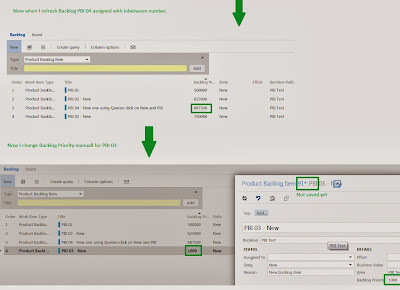

Test 1: I created PBI through web access just providing Name and click add in Backlog.
Test 2: I create PBI with web access going to Queries-->New-->PBI
Test 3: Changed Microsoft.VSTS.Common.BacklogPriority manually.
See how it behaves..and hope you will have a clear understanding of Microsoft.VSTS.Common.BacklogPriority. In terms of usage you can go through this MSDN article.


Tuesday, 9 July 2013
TFS 2013 - Web Access - MSF Agile - Backlog & Board
Lets have a quick look at few cool stuff that will be available with TFS 2013 in MSF Agile Template. With this release Microsoft added Feature work item representing a Feature that is implemented with many user stories. They have made the Backlog and the Board appearance consistent across Web Access Work tab.
Vertical color bars to denote different types of work items, giving a great look to the Board and the Backlog.
1. Feature Backlog

2. Feature Backlog - with User Stories

3. Feature Backlog - with User Stories & Tasks

4. Ease of Access

5. Feature Board

6. Stories

7. Stories to Features

8. Stories to Tasks

9. Stories Board

10. Iteration Backlog

11. Iteration Board - Grouped by Stories

12. Iteration Board - Grouped byPeople

13. Queries
 Cool stuff...greater consistency...and await for more... as I explore in the coming weeks...
Vertical color bars to denote different types of work items, giving a great look to the Board and the Backlog.
1. Feature Backlog

2. Feature Backlog - with User Stories


4. Ease of Access

5. Feature Board

6. Stories

7. Stories to Features

8. Stories to Tasks

9. Stories Board

10. Iteration Backlog

11. Iteration Board - Grouped by Stories

12. Iteration Board - Grouped byPeople

13. Queries

Subscribe to:
Posts (Atom)
Popular Posts
-
 Let’s look at how we can specify the artifact version to download based on the resource CI build linked to the CD pipeline and check on how ...
 -
 The hosts file in /etc/hosts is allowing the WSL distros to map IP addresses to domain names before going to domain name servers, similar...
 -
 Can a Coded UI test executed with a Console Application? Yes it is possible. I am going to explain how it can be done. I am going to exec...
 -
Pull Request are the controlled way to bring in the changes to your stable branches in your Azure Git repos, or for that matter all Git prov...
-
The new Azure Managed Redis can be deployed with balanced compute and memory with high availability, and useful modules such as RedisJson a...

