Managing permissions of a VSTS/TFS sometimes become a nightmare specially if you have many teams groups etc. created in your account and in team projects. It is important to have a way to find group membership of an individual or group, so that you can analyze where the memberships are assigned in order to make required maintenance or change permission activities. Lets look at a command which can help you find that information quickly.
Showing posts with label Team Foundation Server. Show all posts
Showing posts with label Team Foundation Server. Show all posts
Friday, 27 July 2018

Thursday, 28 June 2018
Building and Deploying Windows Services with VSTS/TFS
Generally windows services are deployed by creating an msi installer. It is possible to deploy msi via VSTS/TFS release management using the extension available in the marketplace. Packaging the windows as non msi would give opportunity to have more control on the configurations etc, when deployment and let’s see how to package a windows service and then get it deployed via VSTS/TFS release management.
Tuesday, 22 May 2018
Securing Build Definitions When Multiple Teams Work on a Single Team Project
Securing a build definition is quite straight forward when an organization uses multiple team projects in VSTS/TFS to handle different applications they develop. Each team project build administration can be assigned to different individuals easily. There are organizations using a single team project to manage all of their applications, dividing them into teams inside a single team project. Let's look at possibilities of securing each application teams' builds in single team project for organization scenario.
Thursday, 12 April 2018
Finding Active Team Projects Based on Code CheckIns/Commits
When you have many team projects in your TFS instance or in your team services account (VSTS), manually finding out what are the active projects is not going to be an easy task, by looking at each code repository in each of the projects to determine whether project is getting updated with code changes. TFS/VSTS REST API can be used in this scenario to obtain the projects that have any code commits/checkins from a given date using the script available here.
Tuesday, 27 February 2018
Cloning TFS 2018
How to clone TFS before TSF 2018 is explained in posts, Backing Up and Restoring Databases, Prepare Restored Databases and Configuring the AT. Out of these steps Backing Up and Restoring Databases is valid for TFS 2018. But you do not have to perform the Prepare Restored Databases as it can be done while configuring the Application Tier of the cloned TFS instance. Let’s look at valid steps for cloning TFS 2018.
Wednesday, 3 January 2018
Trigger Build Based on Label/Tag – VSTS/TFS
You might want to trigger a build for a team foundation version control (TFVC) Label applied previously or if you are using Git version control for a Tag. Git tags are quite nicely supported in TFS/VSTS web Interface, but Label in TFVC is still only manageable with the Source Control explorer of Visual Studio. There is a user voice request to enable web experience for TFVC Labels, which you can also vote for 
Monday, 1 January 2018
Configure Search Service for TFS 2018 in a Separate Server to Enable Work Item & Code Search
Work Item Search & Code Search allow TFS users to do advanced and dynamic way of quick searching on code or work items, with drill down etc. To enable Code Search in VSTS you have to install the Marketplace extension for code search, work item search is default enabled for VSTS. You can configure search for on-premises TFS in TFS AT (described here), itself. But if you want to setup search service in a separate box from your TFS AT, you can follow the steps described in this post.
Sunday, 31 December 2017
TFS Build Agent Fail on Get Source After Upgrade
TFS on premise requires you to keep your TFS updated as almost in every quarter a new update to the TFS is released as well as a new version every year. For this you might have to do TFS Upgrades. If you have upgraded from TFS 2015 to TFS 2018 you have to remove the version 1.xx build agents and configure version 2.xx build agents. Your existing build might encounter workspace issues and may not be able to get sources downloaded to build, in the build agents after the upgrade of agents done. Let’s look at how we can get this issue resolved.
Saturday, 30 December 2017
Updating TFS Build Agents from Version 1.xx to 2.xx After TFS Upgrade 2018 from TFS 2015
If you have upgraded the TFS from TFS 2015 to TFS 2018 you will encounter a situation where your vNext build agents 1.xx are no longer valid. You will get a message in the Agent Pool/Queue indicating that the agents are deprecated and you need to migrate them. Let’s understand the steps required to migrate your TFS build agents from 1.xx to 2.xx.
Monday, 25 December 2017
TFS 2015.2 to TFS 2018 Upgrade–Lesson Learnt
It is great if the latest updates to TFS can be applied as and when they are released. But for a large organization it might not be sometimes easy. There may be few version gaps when you try to upgrade your TFS. Let’s discuss a problem with SQL server, faced while upgrading from TFS 2015.2 to TFS 2018, and how can it be fixed without getting into deeper troubles. This upgrade was done after a pre production trial using a clone of the TFS 2015.2, and no issues faced during TFS2015.2 from to TFS 2018 in the trial steps, which were exactly followed in production, except for clone TFS 2015.2 of course. Still in a production scenario you might run into unexpected 
Monday, 18 December 2017
Creating Multiple Artifacts in a Single Build
Sometime you may want to create multiple artifacts in a build for separate each project output into different artifact. This question was asked in a forum “To create CI/CD pipeline to deploy web application and windows service on different VMs there is a need to create separate artifacts, for both project. How artifacts for all projects can be published separately in a CI pipeline ?” To answer that question, let’s look at very simple implementation possibility in VSTS/TFS builds.
Tuesday, 28 November 2017
PS Script Get All Team Projects Listed as HTML–TFS/VSTS
You may want to sometimes satisfy the needs of your team, specially PMs, requesting already available information in document format. Some managers are lazy to go and explore (that's why they choose to be managers not techies) and they sometimes expect information to be delivered to their hands 
Tuesday, 3 October 2017
Setting Quality Profile via VSTS/TFS Build for SonarQube
Sonar analysis helps to identify the technical debt in the source code of your project. Running it integrated with VSTS or TFS builds add more value by automating the quality checks with sonar server. You can define your own custom Quality Profile to analyze your source code with selected set of rules. Let’s look at how you can specify the Quality Profile with the TFS/VSTS build task, that can be used to automate scanning of your code, when using the SonarQube extension in the visual studio marketplace.
Friday, 29 September 2017
TFS DB Restore–DB Set to Suspect
When you have configured backups with TFS admin console and restore them in case of a need, you are expecting, your TFS databases to restore without any issues. But you might run into this situation if you just, missed simple thing to check. For example the target server SQL version, should exactly match to the source or your production TFS, SQL version. Let’s have a look at learning experience I went through due to a slight mistake, which taught me how much vigilant you need to be when you are doing the, administrative work with TFS.
Wednesday, 23 August 2017
Cloning Your TFS Server Part 03 – Configuring the AT
To clone an instance of a TFS server while the current live instance is running it is required to take backups as explained in “Cloning Your TFS Server Part 01 – Backing Up and Restoring Databases” and restore the DBs in new hardware. After that there should be preparation activities run as described in “Cloning Your TFS Server Part 02 – Prepare Restored Databases” to make sure the current and cloned TFS instances are not getting corrupted, when both running simultaneously in the same network. Let's go through the configuration steps to configure the cloned TFS instance.
Tuesday, 22 August 2017
Cloning Your TFS Server Part 02 – Prepare Restored Databases
You have to make sure you are not corrupting your current TFS instance that is up and running, while you are cloning a TFS instance. For this you need to prepare the restored databases of the TFS, in new hardware, before configuring the cloned Application Tier of TFS. In the “Cloning Your TFS Server Part 01 – Backing Up and Restoring Databases” how to back up and restore TFS database was discussed in detail. Let’s look at each of the preparation steps required in order to guarantee both current TS instance and cloned instance can coexist in the same network.
Friday, 7 April 2017
Setup yo team
yo team is a great NPM package by Donovan Brown, to automate creation of build and release pipelines. You can use it to generate app with CI/CD in Team Foundation Server 2017 or Visual Studio Team Services. In this post let’s look at how to get it installed, for you to use it to generate CI/CD pipelines
The first requirement is to install node.js and npm latest. You can download it from https://nodejs.org/en/download/. Instruction on installing on windows is here. You can verify the installed version of node and npm by running below commands.
Monday, 29 August 2016
TFS15 RC1 (TFSvNext) - Resolving - There are no accessible team projects in this Team Project Collection. Contact your Team Foundation Server administrator.
In TFS15 RC1 (TFSvNext) when you setup a tem project with SharePoint site configured, you might see below error.
There are no accessible team projects in this Team Project Collection. Contact your Team Foundation Server administrator.

How to resolve.
To get the SharePoint read access to the team project, add “SharePoint Web Application Services” group to Team Project’s, Readers.


This will allow the SharePoint portal to read the team project information.

Sunday, 28 August 2016
Setup Test Farm as Azure VMs–For TFS2015 Release Management
A test farm which can run test parallel, using more than one test client can improve the time taken to execute the automation test plan. To use resources only on demand setting this up in Azure Virtual machines would be a great option. Let’s look at how we can setup, a test farm, to use with TFS 2015 (TFS 2015 on-premise, update 2.1 onwards).
A fully setup test farm with release management would look like below.(Deployment environments in the release pipeline not shown here for brevity)

Test Farm – Start This environment runs on release agent locally (in corporate network). Expand Variables allows usage of a variable with another configuration variable in release management. Download Artifacts is used to limit the output getting downloaded, to scripts required for starting the test farm in Azure. CreateReleaseRunBlobContainer is used to setup a temporary blob container in azure to allow monitoring of all parallel test machines completion of assigned test execution. Azure resource group deployment step will start the test farm virtual machines, and the wait poweshell script will wait specified number of seconds, after machines started for them to be fully ready. Each of above will be discussed in detail later.
Run Test These environments will run tests parallel in azure VMs. To achieve this, one admin VM is setup in azure with multiple release agents, which deploys test agent to test client. Each test client VM will run a test agent.

Test Farm – Stop This will monitor the blob on azure to determine, if all test environments done with test executions and then shutdown the Azure VMs.
When create release with definition a message popup to say that agents not available for Run Test, this is because Azure machine containing the agent is not started. But this will be OK since the first environment starts Azure VMs.

Once setup fully The test farm can be started on demand and execute tests and shutdown once the test execution done.


In above Test Farm Started, and Tests executed and the Farm Stopped. The Test run steps show as rejected, but actually they are executed fine, only some tests failed marked it as a failed environment (partially succeeded for environment, feature available in VSTS is not yet available for on premise TFS). But this is expected in test run and continue on error for test execution, will enable to run all the tests and after test steps in the given environment (This will e discussed in detail in a later post).

Let’s look at how this can be setup in detail in following posts.
- Create Virtual Network in Azure
- Create Virtual Machines in Azure for the Test Farm. A machine to run release agents (admin machine) and any number of test client machines need to run parallel. All the machines should belong to same workgroup.
- Setup release agents in the admin machine in Azure, to use with each test client following instructions in here.
- Enable PowerShell remoting in each test client and verify access from the test farm admin VM in Azure.
- Setup Test Farm, Start and Stop, and Test Clients for Test Execution.

Wednesday, 1 July 2015
Setup TFS 2015 Windows Build Agent
With TFS 2015 ( RC is available as of now) new build system is introduced. Below is a guide to setup an agent for the new build system.
To download the build agent setup files go to admin mode of the TFS web portal and download the agent.

Extract the contents of the downloaded zip file, to a folder in the machine which is going to be setup as the build agent.

Open a powershell window as administrator and change directory to the extracted folder. Run the ConfigureAgent.ps1. Provide below details for the agent.
* Agent Name
* TFS URL - This should be TFS Server url, not project collection url.
* Specify an agent pool to join.
* Specify a working folder path. Which will be used to download source code and run the builds
* Set the build agent to run as a widows service. Windows service is the better option for production usage.
* Specify credentials for agent service.
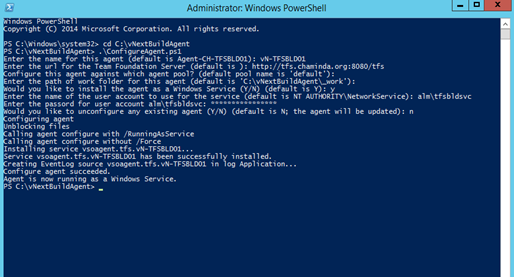
Once this is done the agent service can be seen up and running as a windows service.

The new build agent is available for the build agent pool.

The new windows build agent and XAML build agent can coexist in the same machine, which would useful to support already available XAML build definitions.


To download the build agent setup files go to admin mode of the TFS web portal and download the agent.

Extract the contents of the downloaded zip file, to a folder in the machine which is going to be setup as the build agent.

Open a powershell window as administrator and change directory to the extracted folder. Run the ConfigureAgent.ps1. Provide below details for the agent.
* Agent Name
* TFS URL - This should be TFS Server url, not project collection url.
* Specify an agent pool to join.
* Specify a working folder path. Which will be used to download source code and run the builds
* Set the build agent to run as a widows service. Windows service is the better option for production usage.
* Specify credentials for agent service.

Once this is done the agent service can be seen up and running as a windows service.

The new build agent is available for the build agent pool.

The new windows build agent and XAML build agent can coexist in the same machine, which would useful to support already available XAML build definitions.


Subscribe to:
Posts (Atom)
Popular Posts
-
 The hosts file in /etc/hosts is allowing the WSL distros to map IP addresses to domain names before going to domain name servers, similar...
 -
 Can a Coded UI test executed with a Console Application? Yes it is possible. I am going to explain how it can be done. I am going to exec...
 -
Pull Request are the controlled way to bring in the changes to your stable branches in your Azure Git repos, or for that matter all Git prov...
-
The new Azure Managed Redis can be deployed with balanced compute and memory with high availability, and useful modules such as RedisJson a...
-
We have discueed, that we have to use an environment variable to handle input parameter default values, if we are using trigger for workflo...


