Sometimes you may need to edit files especially the web.config or appsettings.json files after deploying your application to Azure App Service via Kudu or using App Service Editor to change the setting for diagnostic purposes etc. For example, may be you want to enable logs by setting stdoutLogEnabled to true. However, if your application is deployed to Azure App Service via Azure DevOps pipelines’ Azure App Service deployment task, you may run into 409 Access Denied error. Let’s understand why the error occurs and how we can enable editing the files, in your deployed Azure App Service application/Function apps via Kudu or using App Service Editor.
Showing posts with label Azure RM. Show all posts
Showing posts with label Azure RM. Show all posts
Saturday, 13 February 2021

Saturday, 31 August 2019
Setting Up Az Module to Write IaC for Azure
Microsoft has deprecated the AzureRM PowerShell module and introduced new Az PowerShell module for Azure. Bug fixes and support will be available for AzureRM module until December 2020. However, it is better starting migrating any AzureRM based PowerShell scripts which you have written to achieve Infrastructure as Code (IaC) for Azure. For this purpose, you can setup the Azure Az Module in your machine while allowing the AzureRM commands to still work using alias. Let’s look at the steps of setting up Azure Az Module in a machine where Azure RM is already setup.
Thursday, 9 May 2019
Azure DevOps Service Connection for an Azure Subscription in Another Azure AD
Adding Azure Subscription to Azure DevOps as service connection is really simple when you have the same account you are using for Azure DevOps associated with your Azure Subscription. However, this may not be the case always and you may want to deploy to resources in a Azure Subscription which is not related to your Azure DevOps organization. Let’s see how to create a service connection in such situation to utilize it in a deployment pipeline.
Thursday, 11 May 2017
Auto Generating CD Build/Release Pipeline Targeting Azure App Service for MVC Web Application
VSTS allows great flexibility with it’s new web based build and release management features. You have several templates which can be used to create build and release definitions you need quickly. Lots of out of the box tasks allow you to further customize your definitions to support the steps that you need to perform during a build or a deployment. Visual Studio Marketplace is getting more and more components added to it, allowing you to find a task for almost any build deploy step you may require to perform. Taking the steps to the next level, you can now even generate your build/release pipeline with Visual Studio 2017, after adding the extension Continuous Delivery Tools for Visual Studio.
Let’s walkthrough the steps of generating a CD pipeline for an MVC Web Application, to allow it to be deployed to Azure App Service.
Tuesday, 30 August 2016
Azure Web App Swap Slot–With VSTS Release Management using Azure RM
Using deployment slots in Azure is very useful when it comes to production deployments. You can deploy to a deployment slot and then verify and swap the slot with production.
Azure App Service site created with a slot called Deploy.

It is deployed with Visual Studio Team Services, Release Management using a linked Azure Resource Management Service endpoint.

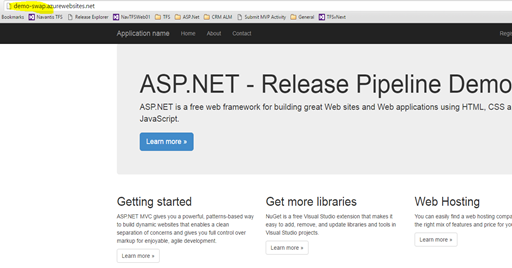
Once the deployment done to “Deploy” slot, demo-swap-deploy.azurewebsites.net is deployed with simple web application.

Still the main site (Production slot) is shown as just created.

Azure Resource Manager command “Invoke-AzureRmResourceAction” can be used in PowerShell to swap the slot.
param($resourceGroupName, $websiteName, $slotName, $targetSlotName)

$ParametersObject = @{targetSlot  = $targetSlotName}
Invoke-AzureRmResourceAction -ResourceGroupName $resourceGroupName -ResourceType Microsoft.Web/sites/slots -ResourceName $websiteName/$slotName -Action slotsswap -Parameters $ParametersObject -ApiVersion 2015-07-01 -Force

Script requires following parameters.
-resourceGroupName "ch-demo-resgroup" -websiteName "Demo-Swap" -slotName "Deploy" -targetSlotName "Production"
- resourceGroupName – Resource Group Name of the Web App
- websiteName – Web App Name
- slotName – Slot Name
- targetSlotName – target Slot
This script can be setup to execute with Azure PowerShell task, in release management.

Once this is executed, slots get swapped.


After swap “Deploy” slot contains what was in “Production” slot and “Production” slot now has the newly deployed site.

Subscribe to:
Posts (Atom)
Popular Posts
-
 The hosts file in /etc/hosts is allowing the WSL distros to map IP addresses to domain names before going to domain name servers, similar...
 -
 Can a Coded UI test executed with a Console Application? Yes it is possible. I am going to explain how it can be done. I am going to exec...
 -
Pull Request are the controlled way to bring in the changes to your stable branches in your Azure Git repos, or for that matter all Git prov...
-
The new Azure Managed Redis can be deployed with balanced compute and memory with high availability, and useful modules such as RedisJson a...
-
We have discueed, that we have to use an environment variable to handle input parameter default values, if we are using trigger for workflo...


