Showing posts with label deployment. Show all posts

Saturday, 13 June 2026

Enable Updating GitHub Environment Variables via GitHub Actions Workflow

 To update environment  variables defined in GitHub environment, via a GitHub action workflow we cannot use the default GITHUB_TOKEN .

  • GITHUB_TOKEN can interact with repository contents (depending on permissions), create releases, comment on PRs, update issues, etc.
  • GITHUB_TOKEN cannot update repository environments, environment secrets, or environment variables via the GitHub REST API.

  • Saturday, 6 June 2026

    Environment Deployment Approvals for GitHub Action Workflow

     In GitHub actvaions workflows we can use environments to scope varibles and protection rules. Let's compare Azure DevOps pipeline environments to GitHub Actions workflow environments, differences regarding environment deployment approvals, in this post.

    An environment can be configured for approvals as shown below.


    Friday, 29 May 2026

    Code for Creating a Multi Stage Workflow Structure with GitHub Actions - Mapping Azure DevOps Multi-Stage Pipelines to GitHub Actions - Part 3

     In the previous post "Create Multi Stage Pipeline Structure with GitHub Actions - The Layout - Mapping Azure DevOps Multi-Stage Pipelines to GitHub Actions - Part 2" we have dicussed the GitHub action workflow layout mapping to the Azure pipeline structure. The code for workflows can be structured as shown below for the pipeline requirement discussed in "Mapping Azure DevOps Multi-Stage Pipelines to GitHub Actions - Part 1". Note that we have seperated folder structure for job actions and step actions to organize the code properly in a manageable way. However, both are really composite actions in GitHub. Each action name is setup using a folder name as it must be action.yml or action.yaml for actions.


    Saturday, 23 May 2026

    Create Multi Stage Workflow Structure with GitHub Actions - The Layout - Mapping Azure DevOps Multi-Stage Pipelines to GitHub Actions - Part 2

     In "Mapping Azure DevOps Multi-Stage Pipelines to GitHub Actions - Part 1" we have discussed the limitation of GitHub action workflows compared to Azure DevOps pipelines. Further, we have compared the features and possible mappings. In this post, let's try how we can create GitHub workflow structure to make it similar to Azure DevOps pipeline shown in "Mapping Azure DevOps Multi-Stage Pipelines to GitHub Actions - Part 1".

    Lets now look at the a the outcome of GitHub workflow setup, and see how it maps to Azure pipeline structure above creating the below pipeline stages.

    GitHub Workflow

    Note that unlike below fully functional Azure pipeline here in GitHub workflow is only having the structure created only. No approval gates setup or actual steps of execution implemented. But structure is setup keeping the real working workflow in mind. The intialize stage in Azure pipeline publishes AKS manifest files as artifacts in same pipeline, to be used in pepeline jobs, without full repo checkout. However, this is intentionally skipped in GitHub workflow as it seems checkout in every job is required to get the actions and jobs to be executed in GitHub workflow.

    Saturday, 16 May 2026

    Mapping Azure DevOps Multi-Stage Pipelines to GitHub Actions - Part 1

     Migrating from Azure DevOps to GitHub Actions is mostly about rethinking stages → jobs, and stage dependencies → job dependencies (needs) while keeping environments and deployment isolation intact. This is a bit challanging task as GitHub actions does not support independant varaible groups and environments as in Azure DevOps. In this post let's look at  how a classic multi-stage deployment flow can be represented cleanly in GitHub Actions.

    The Source Azure DevOps pipline can be a single env deployment such as below.

    Friday, 13 September 2024

    Automate Health Check Validation for AKS Apps with Nginx Ingress Using Azure DevOps Pipelines

     We have discussed "Setup Application Ingress for AKS Using Nginx Ingress controller with Private IP" in a previous post. Once application and nginx ingress setup is deployed it takes some time for containers and pods to be ready for acepting traffic. We should validate whether the application contianers are deployed with correct docker image and running required replicas as specified in the horizontal pod autoscalers. Then we should verify if ingress for apps are setup corectly. If only all these health checks succeeed we can enable live traffic into a newly deployed set of applications in an AKS cluster (This is useful in blue-green deployments with new cluster or node pool to represent the blue or green instance). Let's use PowerShell and write health validation script and get it executed in Azure piplines to automate health check validation for apps deployed to AKS with nginx ingress.

    Expected outecome is to validate ingress setup for application in an Azure DevOps pipelines task as below.


    Friday, 30 June 2023

    Zero Downtime Blue-Green Deployment for AKS with Terraform - Simulation Using a Resource Group with Pipeline Steps

    In this post we use a resource group to demo a blue green deployment scenario for AKS with Terraform IaC, to understand the steps required for successful pipline implementation. Same pattern can be applied to deploy other Azure resources well. Instead of two resource groups used here to run demo faster, actual implementation can be two AKS clusters (blue and green) withing a single resource group or in two resource groups. Full pipeline with Terrafrom IaC for AKS blue greeen with application deployments will be dicussed in a future post(s). For now let's loo at the example blue green, using resource group to represent AKS cluster, which is used to validate blue green deployment algorithm for AKS.

    Full algorithm test information and terraform files available in below links.

    Saturday, 13 February 2021

    Resolving 409 Access Denied in Azure Kudu and App Service Editor

    Sometimes you may need to edit files especially the web.config or appsettings.json files after deploying your application to Azure App Service via Kudu or using App Service Editor to change the setting for diagnostic purposes etc. For example, may be you want to enable logs by setting stdoutLogEnabled to true. However, if your application is deployed to Azure App Service via Azure DevOps pipelines’ Azure App Service deployment task, you may run into 409 Access Denied error. Let’s understand why the error occurs and how we can enable editing the files, in your deployed Azure App Service application/Function apps via Kudu or using App Service Editor.

    Wednesday, 28 October 2020

    Implementing a CD YAML Pipeline with Deployment Job

    We have discussed couple of things related to implementing CD with YAML in the posts “Trigger Deployment YAML Pipeline Once YAML Build Completed” and in “Prevent Checking Out the Repo in CD YAML Pipeline”. However, the checkout of the repo only happens if use the normal job syntax for deployment job as well. Ideally, we should be using job of type of “deployment” in our CD YAML pipelines so the checkout of repo would not happen by default as well as it will be required to define an environment for deployment. The environment helps us to keep track of our deployments. When we implement the CD YAML with deployment jobs download of artifacts would be automatic. Let’s find out how the deployment job implementation looks like.

    Friday, 2 October 2020

    Trigger Deployment YAML Pipeline Once YAML Build Completed

    Now it is possible to implement multi stage pipelines with YAML facilitating the implementation of deployment pipelines as well with YAML instead of classic release pipelines in Azure DevOps. However, having build and deployment steps all together in a single pipeline script is not ideal as it looks bit not a nice implementation from my point of view. With the possibility of triggering another YAML pipeline based on completion of another YAML pipeline, it is possible to separate the Build and Deployment concerns into two different YAML scripts implementing two different pipelines. Let’s have a quick look at how we can trigger a YAML deployment pipeline based on another YAML build pipeline.

    Saturday, 14 December 2019

    Replacing iOS .plist Array Properties in Azure Release Pipelines

    .plist files are used by iOS applications to keep configuration properties. These files support arrays as configurations. In deployment process of Azure DevOps pipelines you may want to update these plist files to have values relevant to the target deployment environments. Let’s see usage of plistbuddy utility to update array items in plist files as the plutil (http://scriptingosx.com/2016/11/editing-property-lists/) is unable to apply the changes.

    Sunday, 1 December 2019

    Implementing Simple and Effective Branching and Deployment Strategy with Azure DevOps

    In the previous post, we have discussed, a simple and effective branching and deployment strategy as a concept. Let’s now have a look at key implementation considerations of the proposed strategy with Azure Git repos and Azure Pipelines.
    Let’s have a look at pictorial representation of the proposed strategy first.

    Sunday, 6 January 2019

    Deploying ASP.NET Core App to Azure Kubernetes Services (AKS)–Setting Up Azure DevOps Pipeline Manually–Step By Step Guide–Part 2

    In the part 1 of this post, enabling Docker support for ASP.NET Core app and building and pushing the Docker image to Azure Container Service, using Azure DevOps build pipeline with simple steps was described. The image is tagged with the build Id and it is pushed to the Azure Container Registry, so that it can be later deployed to a container orchestrator to run the container. Helm is used to get he deployment done to AKS via Azure DevOps when creating a an ASP.NET Core App, Container Registry and AKS, then getting it deployed automatically with few clicks using Azure Projects as described in the post “Deploy ASP.NET Core App to AKS with Azure DevOps Project”. Let’s look at getting the container image in Azure Container Registry deployed to AKS with three simple steps without using Helm, with Azure Pipelines.

    Saturday, 14 July 2018

    Controlling Octopus Releases with VSTS Release Management

    You may be using Octopus deploy for your deployment automation pipeline needs while you are having your builds and work items managed in VSTS. It is a good idea to manage the Octopus release pipeline via VSTS release management so that you have the opportunity to use automated test execution and capturing of test results, as well as easily generate release notes using the VSTS work items, using feature rich tasks and automation test results views in VSTS release management. Let’s look at the important steps required to make VSTS release management to successfully utilize your existing Octopus deploy process steps.

    Monday, 25 June 2018

    Packaging "Assemblies in GAC Installed with SDKs" in Build and Getting Deployed to Target Machine GAC

    There can be projects depending on assemblies in Global Assembly Cache installed with may be a internal company SDK, which would even be installed in developer machines and in build servers. These assemblies should be packaged with the project and deployed to the GAC of target machines such as QA,staging and Production etc.  as well. Since the code repo does not include such assemblies in the build server it may be required to extract those assemblies from GAC and packaged with the builds. Let’s see how we can get the assemblies in GAC packaged and get deployed to targets, using VSTS build and release management.

    Friday, 22 June 2018

    Using NuGet Packages as VSTS Release Artifact Source

    If you are used to deploy your solutions with Octopus deploy which a re built with VSTS/TFS, you are used to package your build output as a NuGet package and use it in Octopus. Now you can use the NuGet packages with VSTS release management as well for deployment. For this you have to have the package management feature in VSTS enabled. As VSTS builds and their artifacts are discarded in a configured time period and the maximum time and  number of builds is limited, keeping artifacts as NuGet packages would be useful you to keep your deployed artifacts for a longer period. Let’s explore how to use NuGet packages for deployment in VSTS release management.

    Sunday, 1 January 2017

    Resolving “Deployment on this environment was cancelled.”

    You might encounter “Deployment on this environment was cancelled.” when you have setup a new build/release agent and try to do a deployment, with on premise TFS. It is a confusing error message and not enough information at all to identify the issue. How to identify where the problem is easier if the agent is on premise. Then you have the ability to look at additional diagnostic logs. Lets look at one example scenario you are getting this error.

    Tuesday, 30 August 2016

    Azure Web App Swap Slot–With VSTS Release Management using Azure RM

    Using deployment slots in Azure is very useful when it comes to production deployments. You can deploy to a deployment slot and then verify and swap the slot with production.

    Azure App Service site created with a slot called Deploy.image

    It is deployed with Visual Studio Team Services, Release Management using a linked Azure Resource Management Service endpoint.

    image

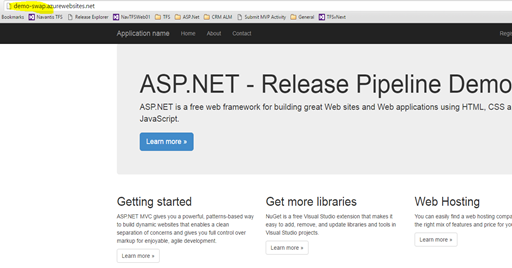
    Once the deployment done to “Deploy” slot, demo-swap-deploy.azurewebsites.net is deployed with simple web application.image

    Still the main site (Production slot) is shown as just created.image

    Azure Resource Manager command “Invoke-AzureRmResourceAction” can be used in PowerShell to swap the slot.

    param($resourceGroupName, $websiteName, $slotName, $targetSlotName)
    
    $ParametersObject = @{targetSlot  = $targetSlotName}
    Invoke-AzureRmResourceAction -ResourceGroupName $resourceGroupName -ResourceType Microsoft.Web/sites/slots -ResourceName $websiteName/$slotName -Action slotsswap -Parameters $ParametersObject -ApiVersion 2015-07-01 -Force
    

    image

    Script requires following parameters.

    -resourceGroupName "ch-demo-resgroup" -websiteName "Demo-Swap" -slotName "Deploy" -targetSlotName "Production"

    • resourceGroupName – Resource Group Name of the Web App
    • websiteName – Web App Name
    • slotName – Slot Name
    • targetSlotName – target Slot

    This script can be setup to execute with Azure PowerShell task, in release management.image

    Once this is executed, slots get swapped.image

    image

    After swap “Deploy” slot contains what was in “Production” slot and “Production” slot now has the newly deployed site.image

    image

    Friday, 8 July 2016

    Deploy .dacpc to Azure DB via VS Team Services Release–Using Hosted Agents

    To deploy a .dacpac to Azure DB with VS Team Services you can use “Azure SQL Database Deployment” task. image

    Setup either Azure Classic service endpoint or Azure RM Service endpoint in the, Team Services team project. image

    In a build or release definition add an “Azure SQL Database Deployment”  task.  Both classic and RM based setting up shown below.image

    Provide

    1. Path to the .dacpac file. (build artifact drop path when used in a release definition)
    2. Azure DB server name
    3. Azure DB name
    4. Azure DB Server user name
    5. Azure DB Server user password
    6. Specify firewall rule to use AutoDetect and delete the rule once done.

    image

    image

    or you have the option of setting firewall rule like below to get it working. Since you are deleting rule once done this is ok. But it is not that secure to allow all IPs like below.image

    This can successfully deploy the .dacpac file to Azure DB using VS Team Services Release.image

    image

    image

    Saturday, 10 October 2015

    Increase Default Timeout of Copying Test Binaries to Test Client – Allow Release Management to Run Tests with Increased Timeout

    Default timeout for downloading test binaries to execute automated tests in a lab environment is 5 minutes. This might not be enough if the test assemblies are high in size, and test client machine is in a different location from the build drop LAN having low bandwidth.
    If running via RM server, MTM Test runner, test hangs on active and never get executed.image
    trx file opened in Visual Studio Ultimate shows the exact issue.image
    *******************************************************************************************************
    Warning    9/25/2015 7:27:10 PM    Warning: Test Run deployment issue: The assembly or module 'Microsoft.Xrm.Sdk.Deployment' directly or indirectly referenced by the test container '\\builddrop\testautomation\xxx.automation.nonui.dll' was not found.   
    Error    9/25/2015 7:32:15 PM    Agent vstfs:///LabManagement/TestMachine/36 exceeded deployment timeout period.    vstfs:///LabManagement/TestMachine/36
    *******************************************************************************************************
    How to resolve
    The testcontroller deploys the test binaries and their dependencies from the build drop location to the test agent machines so that test agent can run them. The timeout for that activity is called deployment timeout.
    Test setting should be created and set the deploy time out in the test settings, following instructions here. The command to execute is below.
    UpdateTestSettings /collection:http://abc:8080/tfs/DefaultCollection /teamProject:myProject /settingsname:My2_0_App /bucketSize:200 /deploymentTimeout:600000
    Next step is providing test settings to the test run via the RM server, MTM Test runner. For this TcmExec.ps1 explained here, has a parameter for test settings.0
    To provide this in the RM tool (custom tool created using the TcmExec.ps1 explained here), add a parameter as shown below.image
    This will not be applied to existing components created with the RM tool. Update them to have the SettingsName parameter.2 image
    This allows the SettingsName to be supplied to the test via Release Management Template.4
    Test now executes after successfully downloading the test binaries to the test client.image

    Popular Posts