Showing posts with label vs 2012. Show all posts

Monday, 22 July 2013

MTM - Enable Screen Capture for Testing

There is build in screen capture capability coming with MTM/VS 2012. It is another cool feature giving great input for the developers when they try to reproduce the bugs. Simply you do not have to complain as developers, that I cannot reproduce in my machine, because I am not sure what the QA has done. Now you can see each of the actions QA performed for testing.

Lets look at how to enable the screen capturing in MTM (Microsoft Test Manager).

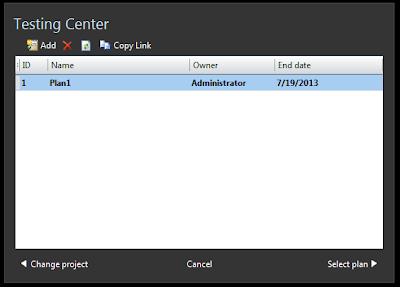
First you have to open MTM and connect to a test plan.


Then go to plan properties and create new test settings or you can modify an existing setting


Give a name to settings


Set roles


Go to Data and Diagnostics and enable Screen and Voice Recording


You can set additional options by  clicking on configure


That it and you are done.


Now when you run tests with the test plan screen recording will start automatically.


When you create a bug it captured video will be added to the bug, and the action recording will give more info. as well.


The Bug now has a link to the captured video of the test actions performed.


You can play the video in a media player.


Wednesday, 8 May 2013

Why CI Build

There is lot of talk on CI builds nowadays. Have you ever thought why it has become a hot topic? Or is it really important? What is the benefit of it? OK to answer all above I will take you through a very simple demo with even simpler sample.

For simplicity let's say we only have two developers in our team. The Developer A and the Developer B. They both are working on a windows forms application referring to a class library from that.


Our Developer A starts development and he creates a method "GetWelcomeMessage" in Class1. Then he uses it in his Form1 he is developing in the Windows Application.


Developer A compiles this code successfully and checks-in the Class1 and Form1. Now the source control server (TFS) has the files as below.


Now our Developer B takes the latest version from source control server and he adds another form, Form2 and use the method developed by Developer A.


Developer B compiles his code successfully in his development PC and checks-in the code. Now the server copy will be like below.


The source control server (TFS) now have the code checked-in by both Developer A and Developer B. This source code is valid and compiles without any issue if latest version is downloaded to any of the developers' PCs.

Now our Developer A becomes a little bit lazy next day morning and do not bother to get the latest version from the server. So he still has only Form1 and the Class1 in his solution.


Developer A starts modifying code from yesterday WITHOUT getting the latest version from source control server. He changes Class1 "GetWelcomeMessage" method to accept a parameter (username) and include that in the return message. Then he modifies the Form1 method call to Class1."GetWelcomeMessage" to send the username.

The Developer A compiles the code in his development PC, and it looks good and compiles successfully. Developer A checks-in the modified Class1 and Form1 code to the source control server(TFS).

Now what is the status of the code in source control server. The Developer A has checked-in set of changes which is causing build errors in the solutions latest copy in the source control server.


Now if developer A or B download the latest version from source control server, none of them will be able to compile the solution. If both of them lazy enough to not to get the latest version, they will keep on developing and adding new files for their respective tasks without knowing about the errors in the latest copy of the solution. May be they will discover this just before, when they try to release to QA.

Wouldn't it be nice to have someone who compiles the source code checked-in to the Source Control Server (TFS) and alert the two Developers A,B about the broken build status, and the changes that caused the build break.

Exactly that is the job of a CI build in TFS world. CI build will build the Source Control Server version of the source code for each checked-in, change-set and alert if there is any build failures. This will give lot of benefit to the developers to easily identify the issue in the build by detecting the change-set caused the build break.

In my next post I will explain how to setup a CI build , for a solution with TFS 2012 & VS 2012.
Wednesday, 17 April 2013

Code Review with TFS 2012 and VS 2012

Let's have a look at another cool feature comes along with VS 2012 and TFS 2012. There is traceability and visibility of entire code review process with this new feature. It is very easy to use as well.

I will explain everything related to  code reviews with a very simple example. I have simple button click which assigns a text to a text box in my form. I want my supervisor to do a code review on this great implementation that I have done before I check in my source code. So I got to Team Explorer --> My Work and request a code review.

I can choose who would do the code review.It can be more than one person. I enter a title for the code review and a description if I want.  When I submit my request VS 2012 associates all code files I have changed or newly added (my all pending changes) to the code review request. Behind the scene what happens is my pending changes are shelved and that shelve-set is associated automatically to the Core Review Request TFS work item.


It is possible to submit already checked in change-set to code review as well. Simply right click on change-set and request a code review.


The supervisor(s) will see the code review request on his My Work. He has the
option to accept or decline the request.


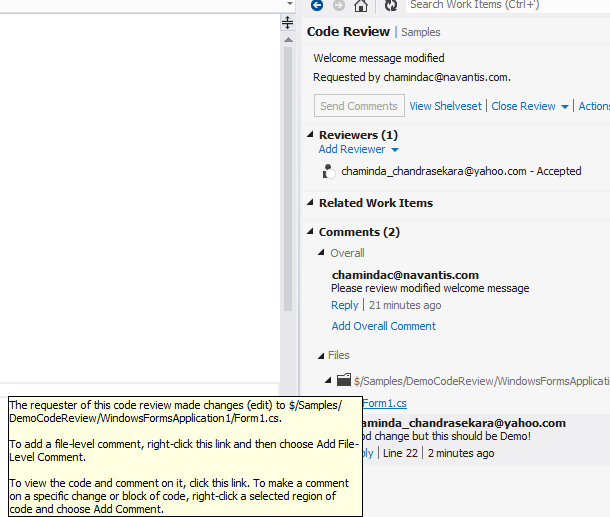
Reviewer can view the changes done and can comment  as overall comment or comment on files or even add comment highlighting the code sections.


Reviewer can mark each individual file as reviewed to keep track of his own activities.


 He can add comments and save them. The comments will only be seen by the other party when he send them.


Once reviewer send the code review comment or finishes the code review I can see it in My Work and close the code review request.


I can do changes on my supervisors recommendations and mark them as done to keep track, and create a new code review request if I want. This time my old code review is automatically linked with new code review. Like all other work items in TFS world, history is recorded for Code Reviews and you can review your code reviews.

Great stuff..isn't it? VS 2012/ TFS 2012 rocks with these new cool features.


Tuesday, 19 February 2013

Set up TFS 2012 on Windows Server 2008 R2 - A quick guide to installation

After a year long break I thought of writing on ALM again. I am going to give set of steps to install TFS 2012 on a Single server. You can use TFS2012 on cloud with visualstudio.com, but installing/configuring it will give you a good experience and  in depth knowledge. Anyone planing to take MS certification exam for Administering Visual Studio Team Foundation Server 2012 will have a definite advantage when you do all by yourself.

So lets start,

1. Install Win 2008R2
2. Change computer name and Setup as PDC or Add to existing domain - It is useful to configure your own domain if you are trying out in a VPC for learning purpose.
3. Install Web Server(IIS) Role with ASP.net and Basic Authentication
4. Install SQL 2012 Standard/Enterprise or developer (Express is not having Analysis Services/Reporting Services)
5. Install Sharepoint Foundation 2010 -- REMEMBER --> Do not configure now
6. Install Sharepoint Foundation 2010 SP1 --  Configure Sharepoint..Add TFS service account to Farm Administrators group of sharepoint...Create default team site
7. Install TFS 2012
8. Configure TFS 2012 in Advanced Mode, make sure to select the installed Sharepoint Foundation 2010 in the sharepoint configuration step.

Above is brief but that's all you need. Additionally you can install MS office/MS project to have a better ALM experience integrated with TFS 2012.

If you need more info or help...contact me.. :)

I hope to discuss more details on ALM with VS 2012 & TFS 2012 in coming weeks...

Popular Posts