We have discussed couple of things related to implementing CD with YAML in the posts “Trigger Deployment YAML Pipeline Once YAML Build Completed” and in “Prevent Checking Out the Repo in CD YAML Pipeline”. However, the checkout of the repo only happens if use the normal job syntax for deployment job as well. Ideally, we should be using job of type of “deployment” in our CD YAML pipelines so the checkout of repo would not happen by default as well as it will be required to define an environment for deployment. The environment helps us to keep track of our deployments. When we implement the CD YAML with deployment jobs download of artifacts would be automatic. Let’s find out how the deployment job implementation looks like.
Showing posts with label download. Show all posts
Showing posts with label download. Show all posts
Wednesday, 28 October 2020

Saturday, 6 August 2016
Download Artifacts–VSTS/TFS Extension Updated–Issue Fix and Enhancements
The VSTS/TFS Release extension Download Artifacts, had an issue of failing if there is spaces in the build definition name or build drop UNC paths. This issue has been fixed with the latest version 1.1.15.
Updating from version 1.0.18 to 1.1.15 requires to edit the release definition and save it to, fix parameter not found issues, for removed input parameters.
Issue
https://github.com/chamindac/vsts.release.task.download-artifacts/issues/1

Fixed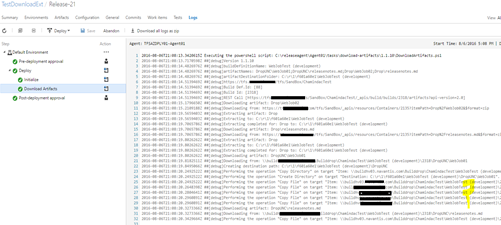
Enhancements
Provided facility to download sub folders or files, without downloading the entire artifact folder. Source build information is now automatically picked. No Need to provide additional parameters for it.
Artifact Names/Paths to Download separated by ;. Example *(default) as artifact names allow all artifacts download. Multiple artifacts can be specified with pattern Drop1;Drop2. Artifact name with sub path allows to download sub item of a given artifact. Multiple can be specified with pattern Drop1\MyWebProj;Drop1\ReleaseNote.html;Drop2;Drop3\MyWebProj2 . Wild cards in paths are NOT SUPPORTED. * value as default supported to specify all artifacts.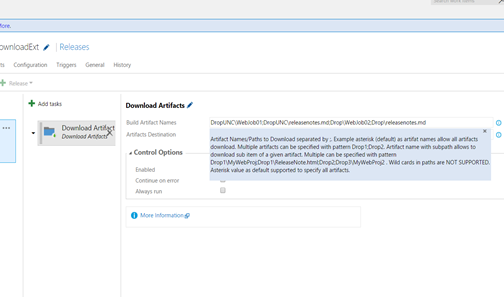

Updating from version 1.0.18 to 1.1.15 requires to edit the release definition and save it to, fix parameter not found issues, for removed input parameters.
Issue
https://github.com/chamindac/vsts.release.task.download-artifacts/issues/1

Fixed

Enhancements
Provided facility to download sub folders or files, without downloading the entire artifact folder. Source build information is now automatically picked. No Need to provide additional parameters for it.
Artifact Names/Paths to Download separated by ;. Example *(default) as artifact names allow all artifacts download. Multiple artifacts can be specified with pattern Drop1;Drop2. Artifact name with sub path allows to download sub item of a given artifact. Multiple can be specified with pattern Drop1\MyWebProj;Drop1\ReleaseNote.html;Drop2;Drop3\MyWebProj2 . Wild cards in paths are NOT SUPPORTED. * value as default supported to specify all artifacts.


Subscribe to:
Posts (Atom)
Popular Posts
-
As we discusssed in " Setup Redis Cluster with JSON and Search Modules on AKS with Binami Redis Using Custom Image " the cluster...
-
 Let’s look at how we can specify the artifact version to download based on the resource CI build linked to the CD pipeline and check on how ...
 -
 The hosts file in /etc/hosts is allowing the WSL distros to map IP addresses to domain names before going to domain name servers, similar...
 -
 Can a Coded UI test executed with a Console Application? Yes it is possible. I am going to explain how it can be done. I am going to exec...
 -
Pull Request are the controlled way to bring in the changes to your stable branches in your Azure Git repos, or for that matter all Git prov...

