We have discussed couple of things related to implementing CD with YAML in the posts “Trigger Deployment YAML Pipeline Once YAML Build Completed” and in “Prevent Checking Out the Repo in CD YAML Pipeline”. However, the checkout of the repo only happens if use the normal job syntax for deployment job as well. Ideally, we should be using job of type of “deployment” in our CD YAML pipelines so the checkout of repo would not happen by default as well as it will be required to define an environment for deployment. The environment helps us to keep track of our deployments. When we implement the CD YAML with deployment jobs download of artifacts would be automatic. Let’s find out how the deployment job implementation looks like.
Showing posts with label artifacts. Show all posts
Showing posts with label artifacts. Show all posts
Wednesday, 28 October 2020

Monday, 3 February 2020
Pushing NuGet Packages to Azure DevOps Artifact Feeds Manually
In the build pipelines of Azure DevOps we can easily push a NuGet package, using a NuGet push step and selecting the artifact feed, in the Azure DevOps organization or team project. But you may sometimes need to push packages manually to Azure Artifact feeds. Let’s look at how we can do that.
Friday, 22 June 2018
Using NuGet Packages as VSTS Release Artifact Source
If you are used to deploy your solutions with Octopus deploy which a re built with VSTS/TFS, you are used to package your build output as a NuGet package and use it in Octopus. Now you can use the NuGet packages with VSTS release management as well for deployment. For this you have to have the package management feature in VSTS enabled. As VSTS builds and their artifacts are discarded in a configured time period and the maximum time and number of builds is limited, keeping artifacts as NuGet packages would be useful you to keep your deployed artifacts for a longer period. Let’s explore how to use NuGet packages for deployment in VSTS release management.
Monday, 18 December 2017
Creating Multiple Artifacts in a Single Build
Sometime you may want to create multiple artifacts in a build for separate each project output into different artifact. This question was asked in a forum “To create CI/CD pipeline to deploy web application and windows service on different VMs there is a need to create separate artifacts, for both project. How artifacts for all projects can be published separately in a CI pipeline ?” To answer that question, let’s look at very simple implementation possibility in VSTS/TFS builds.
Saturday, 6 August 2016
Download Artifacts–VSTS/TFS Extension Updated–Issue Fix and Enhancements
The VSTS/TFS Release extension Download Artifacts, had an issue of failing if there is spaces in the build definition name or build drop UNC paths. This issue has been fixed with the latest version 1.1.15.
Updating from version 1.0.18 to 1.1.15 requires to edit the release definition and save it to, fix parameter not found issues, for removed input parameters.
Issue
https://github.com/chamindac/vsts.release.task.download-artifacts/issues/1

Fixed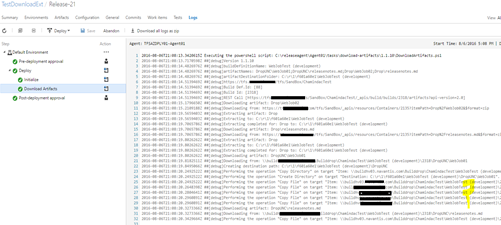
Enhancements
Provided facility to download sub folders or files, without downloading the entire artifact folder. Source build information is now automatically picked. No Need to provide additional parameters for it.
Artifact Names/Paths to Download separated by ;. Example *(default) as artifact names allow all artifacts download. Multiple artifacts can be specified with pattern Drop1;Drop2. Artifact name with sub path allows to download sub item of a given artifact. Multiple can be specified with pattern Drop1\MyWebProj;Drop1\ReleaseNote.html;Drop2;Drop3\MyWebProj2 . Wild cards in paths are NOT SUPPORTED. * value as default supported to specify all artifacts.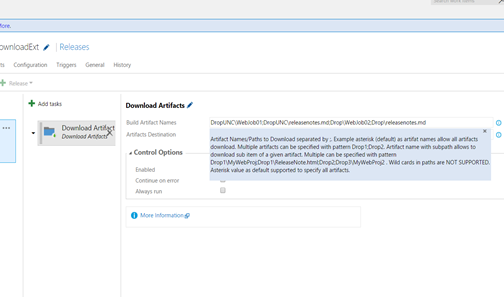

Updating from version 1.0.18 to 1.1.15 requires to edit the release definition and save it to, fix parameter not found issues, for removed input parameters.
Issue
https://github.com/chamindac/vsts.release.task.download-artifacts/issues/1

Fixed

Enhancements
Provided facility to download sub folders or files, without downloading the entire artifact folder. Source build information is now automatically picked. No Need to provide additional parameters for it.
Artifact Names/Paths to Download separated by ;. Example *(default) as artifact names allow all artifacts download. Multiple artifacts can be specified with pattern Drop1;Drop2. Artifact name with sub path allows to download sub item of a given artifact. Multiple can be specified with pattern Drop1\MyWebProj;Drop1\ReleaseNote.html;Drop2;Drop3\MyWebProj2 . Wild cards in paths are NOT SUPPORTED. * value as default supported to specify all artifacts.


Saturday, 16 July 2016
Chamindac.vsts.release.task.download-artifacts is Now Public in VS Marketplace!
The first extension made by me, “Chamindac.vsts.release.task.download-artifacts” is now public in VSTS Marketplace.

Getting started details can be found in this post “VSTS Release Task – Download Artifacts – Filter for Given Artifact Name(s)”
Why this extension is required is explained in post “Multiple Build Artifacts–TFS 2015/VSTS Builds”.
Source code for this extension is available in Github.
VSTS Release Task – Download Artifacts – Filter for Given Artifact Name(s)
This extension “Chamindac.vsts.release.task.download-artifacts” for VSTS and TFS 2015.2.1 upwards, can be used to filter for build artifacts by name, and download only required artifact(s), to the release agent machine. The requirement for this extension is explained in post “Multiple Build Artifacts–TFS 2015/VSTS Builds”. Source code for this extension is available in Github.
Extension “Chamindac.vsts.release.task.download-artifacts” can be downloaded/installed from VSTS Marketplace. To install to VS Team Services click on install, or download for on-premise TFS 2015 (TFS 2015.2.1 upwards supported).

Once installed, in release definition tasks a new task will be available under Utilities.

Always add this task as first task of the release environment and make sure the environment is set to skip artifact download.


The tasks comes with default filled values to behave as normal Download artifacts.

Build artifact names should be specified in ; separated syntax. Or it can be a single artifact name. Or * for all Artifacts.

Artifact destination is set default to behave as similar to, out of the box, build artifact download.

This task will filter the build artifacts with given names and download only the specified ones.

Multiple Build Artifacts–TFS 2015/VSTS Builds
It is possible to create multiple drops in a new TFS 2015 build or in VS Team Services build. This is useful when you want to do a single build but want to have separate drops(artifacts), for different deployment purposes.
One such example is
- Artifact Drop for deployment of a website
- Artifact Drop to contain test automation dlls, and required scripts to run test automations, after successful deployment.
In this situation the deployment happens in a web hosting server and the release agent used there is not going to run the test automations. The agent running test automations will be a separate agent, configured in test client(s), administering machine.
Example 2
- Drop to deploy web server
- Artifact Drop to deploy to a CRM server or to a Database Server
Same as above it could be two different release agents configured in two different machines, which does not need others build artifact.
But with the above requirement in mind, it is always advisable to build all components, in a single build to make sure the version is properly built and in sync.
Is it possible to have multiple build artifacts in a single build?
Yes. Let’s look at how we can do that. It can be done by, adding more publish or copy publish tasks to your build definition.


One drop can be in File Share while other can be in Server (Can have both in File Share or both in Server as well).

When a build is done with the above settings, two build artifacts get created for the build.

Next Challenge: Download the only required artifact to the relevant release agent.
With the out of the box functionality in TFS 2015.3 or with VS Team Services currently this is not possible. It does not allow to filter for a given artifact when downloading. Only option is skip download (no artifacts download) or download all artifacts.

When the above skip download is unchecked all artifacts get downloaded to agent. No filtering possible.


How to download only required artifact?
A new extension with capability to filter for named build artifacts and download only them is created. The code is available in here. The extension “Chamindac.vsts.release.task.download-artifacts” is available in VSTS Marketplace. Usage of extension is explained in this post “VSTS Release Task – Download Artifacts – Filter for Given Artifact Name(s)”
Subscribe to:
Posts (Atom)
Popular Posts
-
 The hosts file in /etc/hosts is allowing the WSL distros to map IP addresses to domain names before going to domain name servers, similar...
 -
 Can a Coded UI test executed with a Console Application? Yes it is possible. I am going to explain how it can be done. I am going to exec...
 -
Pull Request are the controlled way to bring in the changes to your stable branches in your Azure Git repos, or for that matter all Git prov...
-
The new Azure Managed Redis can be deployed with balanced compute and memory with high availability, and useful modules such as RedisJson a...
-
You might encounter compilation error in Visual Studio 2015 when a new .NET Core 1 web app is created, if you have installed Visual Studio 2...


