Showing posts with label permission. Show all posts

Saturday, 27 July 2024

Resolve "GraphQL: Resource not accessible by integration (addLabelsToLabelable)" in GitHub Actions While Updating an Issue Label

 GitHub action workflow can be setup to set a lable to any newly created issue, using below code. If we want to add a lable "triage" to a new issue once opened we can create below workflow.

on:
  issues:
    types:
      - opened

jobs:
  label_issue:
    runs-on: ubuntu-latest
    steps:
      - env:
          GH_TOKEN: ${{ secrets.GITHUB_TOKEN }}
          ISSUE_URL: ${{ github.event.issue.html_url }}
        run: |
          gh issue edit $ISSUE_URL --add-label "triage"

HHowever, you may see error "GraphQL: Resource not accessible by integration (addLabelsToLabelable)", when the workflow is executed. Let's see how we can resolve the issue in this post.

Thursday, 13 July 2023

Fix Terraform Azure AD App Registration (SPN) Read Permssions Running with Azure DevOps Pipelines

 Azure DevOps use service principals (SPN or Azure AD app registration) to make a service connection to Azure to be able to run Terraform or other IaC based resource deployments targeting Azure. You may run into issue while trying to read another Azure AD app registration information, within terraform. For example consider below code segment.

# aks kv app
data "azuread_application" "akskv" {
  display_name = "${var.PREFIX}-${var.PROJECT}-aks-kv-app"
}

data "azuread_service_principal" "akskv" {
  application_id = data.azuread_application.akskv.application_id
}

Saturday, 24 June 2023

Fix Terraform Azure AD Group Read with "403 Insufficient privileges" in Azure Pipelines

 For deploying Azure resources  with Terraform via Azure pipelines we use service principals (SPN) to connect to Azure from Azure DevOps. You might encounter "403 Insufficient privileges" errors while trying to read Azure AD groups data, which you might want to use to create role assignment in the new resources you are provsioning with Terraform. For example it can be a Azure AD group referred as data as shown below.


# refer to sub_owners AD group to assign as aks admins
data "azuread_group" "myteam" {
  display_name     = "sub_owners"
  security_enabled = true
}

 Let's look at the how to resolve the exception "403 Insufficient privileges".

Wednesday, 21 June 2023

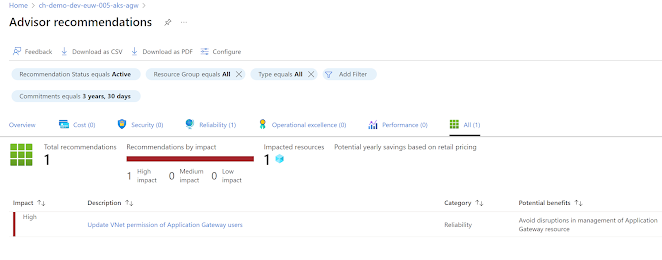
Fix Azure Advisor "Update VNet permission of Application Gateway users" in AKS Application Gateway Ingress Controller (AGIC) App Gateway

 In last two days there was an alert in the AKS ingress app gateway, recomending to  "Update VNet permission of Application Gateway users". Then starting on 20th June 2023, any newly created  AKS cluster with AGIC, started to fail to manage ingess settings on app gatway for eastus region. Same behavoiur is shown in westeurope region today 21 June 2023. 


ch-demo-dev-euw-005-aks-agw-snet to perform action Microsoft.Network/virtualNetworks/subnets/join/action. For details on the required permissions, 

Tuesday, 8 December 2020

Resolving “TF401019: The Git repository with name or identifier xxxx does not exist or you do not have permissions for the operation you are attempting.” in Azure Pipelines git Submodule Checkout

Submodule in Git repos help you to keep the common code modules in a separate repo and utilize in multiple other repos. In the classic and YAML build pipelines you can checkout git submodules as explained in the post “Git Repo Submodule Checkout in Azure DevOps Build Pipelines”. However, you may encounter the below issue while running such build pipelines having to perform a git submodule checkout.

Cloning into 'D:/a/1/s/Infra/AzCLI'...

remote: TF401019: The Git repository with name or identifier InfraCLI does not exist or you do not have permissions for the operation you are attempting.

fatal: repository 'https://dev.azure.com/yourorg/DevOps/_git/yourrepo/' not found

fatal: clone of 'https://yourorg@dev.azure.com/yourorg/DevOps/_git/yourrepo' into submodule path 'D:/a/1/s/Infra/AzCLI' failed

Failed to clone 'Infra/AzCLI'. Retry scheduled

Wednesday, 11 July 2018

Securing Release Definitions When Multiple Teams Work on a Single Team Project

We have explored “Securing Build Definitions When Multiple Teams Work on a Single Team Project” in a previous post. Now the folders to group release definitions and applying permissions to isolate each team’s release definitions is also a possibility in VSTS. As we discussed in the “Securing Build Definitions When Multiple Teams Work on a Single Team Project” it is important to create the Build/Release admins VSTS permission group for each of the teams in the team project. Using the same admins group and the team we can setup permissions for release definitions folders. Let’s look at the steps in detail.

Tuesday, 22 May 2018

Securing Build Definitions When Multiple Teams Work on a Single Team Project

Securing a build definition is quite straight forward when an organization uses multiple team projects in VSTS/TFS to handle different applications they develop. Each team project build administration can be assigned to different individuals easily. There are organizations using a single team project to manage all of their applications, dividing them into teams inside a single team project. Let's look at possibilities of securing each application teams' builds in single team project for organization scenario.

Tuesday, 28 June 2016

Make Agent Queues - Usable to Team Project Users–TFS 2015 Build/Release Agent Pool Usage Access in Build/Release Definitions

Agent queue in a TFS 2015 build definition will not be listed for team project administrator, even though he can save a build definition.image

To make agent pool available for the user creating a release or build definition in TFS 2015, you have to add to Agent queue users in the team project collection agent queues, “Agent Queue Users” role.image

This will make the queue available to the build/release definitions. But this will enable access to all agent queues.image

This happens because when you add to, it gets added to All queues level when you add as shown above. image

To restrict to a given agent remove from “Agent Queue Users” role, of the collection and add only to the relevant agent queue.image

image

This will make the user added only to the relevant queue, Agent Queue Users. Not to the collection role. image

Only the permission granted agent queue is available for the user.image

Popular Posts