Showing posts with label restart. Show all posts

Wednesday, 5 March 2025

Setting Up Alert for AKS Pod Restarts Using Log Analytics Workspace and Grafana

 Azure Kubernetes Services (AKS)  pod restarts can be obtained from the KubePodInventory of the connected log analytics workspace. This data can be depicted in a graph in grafana as described in the post "Pod Restart Counts Grafana Chart with Azure Monitor for AKS". Let's explore how to use same information to create an alert using Grafana to notify when pod restarts are happening in apps in a given kubernetes namespace. 

The expectation is to fire alerts from Grafana as shwon below. Note that the alerts can target to send emails, slack notficaition etc. which is not discussed in this post.

Saturday, 22 April 2023

Restart Count Details of Each Pod and Container for App in Grafana Chart with Azure Monitor for AKS

 Pod and container restart counts monitoring are discussed in posts "Pod Restart Counts Grafana Chart with Azure Monitor for AKS" and "Container Restart Counts Grafana Chart with Azure Monitor for AKS". Those two charts show summarized view per service. To view details of pod and container restarts for an individual service we can create another chart as described in this post.

Friday, 17 March 2023

Container Restart Counts Grafana Chart with Azure Monitor for AKS

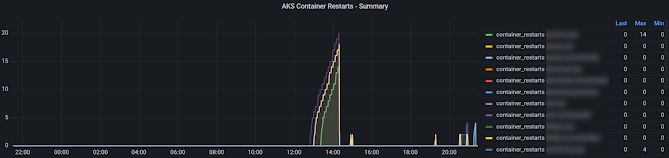
 We have disucussed pod restart Grafana panel in AKS in the post "Pod Restart Counts Grafana Chart with Azure Monitor for AKS". We can create similar panel for container restarts using managed Grafana in Azure for AKS using Azure monitor.

Expected Outcome

Panel similar to below showing contianer restarts for a applications over time with a table showing last container(s) of application restarts, maximum restarts for each application.


Saturday, 4 March 2023

Pod Restart Counts Grafana Chart with Azure Monitor for AKS

 If your pods are often restarting it might indicate a problem you might have in your application deployed to AKS. For example, there was some significant number of restarts seen in .NET 3.1 applications deployed to AKS (reason found as .NET 3.1 issue which is supposedly fixed in .NET 5, so the approach to fix was to update the applications to .NET 6), which were only appearing in development and in staging envronments, while QA environment haven't shown a single restart. Threfore, it is important to monitor the restart counts in pods to identify issues you might not see in development or QA envronements, but may occur in production environments. Let's see how we can create a pod restart count panel in managed Grafana in Azure for AKS using Azure monitor.

Saturday, 13 August 2016

Restart Widows Services–VSTS/TFS Release Management Task - Chamindac.vsts.release.task.restart-win-service

This release task can be used with Visual Studio Team Services or With TFS 2015.2.1 onwards, to restart a windows service with all its dependent windows services, currently running. Source code available in github.image

RestartService-AddTask

Task requires one mandatory parameter Service Name. For this parameter Service Name or Service Display name can be provided.

RestartService-01

Once run it will stop all dependent services that are running currently, and restart the main service, then start the dependent services stopped earlier. The dependent services that were not running when the restart request made, will not be started, so that the system services state will remain same after restart service script run.image

Known Issue

If the agent is running with non administrator account like NetworServices account, task will fail with an error. For example attempting a restart of w3svc might fail with below error.

Service 'World Wide Web Publishing Service (w3svc)' cannot be stopped due to the following error: Cannot open w3svc service on computer '.'image

Friday, 7 August 2015

Restart Services with Dependant Services – Using PowerShell to Create RM Component

In release management there is a tool available to restart a service. This works fine as long as there is no other service depending on the service being restarted. If there is any dependant service this action throws an error.
1
image
Investigation in WWW revealed using a PowerShell to do this is not that easy. Few important links on this is here.
https://support.software.dell.com/appassure/kb/128574
https://social.technet.microsoft.com/Forums/scriptcenter/en-US/574d175f-c370-4bd5-9bf1-c5e400362dfa/powershell-script-to-restart-a-service-and-its-dependents-and-their-dependents?forum=ITCG&prof=required
http://www.blogmynog.com/2010/06/22/powershell-script-to-restart-service-and-dependents/
Each solution in above link had some sort of an issue. Some did not work if there is dependency in another dependant service. Some solution not have the correct order of stop start sequence.  Some does not start only the services that were running earlier.
Out of above
https://social.technet.microsoft.com/Forums/scriptcenter/en-US/574d175f-c370-4bd5-9bf1-c5e400362dfa/powershell-script-to-restart-a-service-and-its-dependents-and-their-dependents?forum=ITCG&prof=required
the question (by Scott W. Sander) itself had a great code segment. A little bit of enhancement to that script made below powershell script which is perfectly working. Download from here https://gallery.technet.microsoft.com/PowerShell-Script-for-8243e5d1


 1
 2
 3
 4
 5
 6
 7
 8
 9
10
11
12
13
14
15
16
17
18
19
20
21
22
23
24
25
26
27
28
29
30
31
32
33
34
35
36
37
38
39
40
41
42
43
44
45
46
47
48
49
50
51
52
53
54
55
56
57
58
59
60
61
62
63
64
65
66
67
Param (
[Parameter(Mandatory=$true)] [String]$ServiceName
)

[System.Collections.ArrayList]$ServicesToRestart = @()

function Custom-GetDependServices ($ServiceInput)
{
 #Write-Host "Name of `$ServiceInput: $($ServiceInput.Name)"
 #Write-Host "Number of dependents: $($ServiceInput.DependentServices.Count)"
 If ($ServiceInput.DependentServices.Count -gt 0)
 {
  ForEach ($DepService in $ServiceInput.DependentServices)
  {
   #Write-Host "Dependent of $($ServiceInput.Name): $($Service.Name)"
   If ($DepService.Status -eq "Running")
   {
    #Write-Host "$($DepService.Name) is running."
    $CurrentService = Get-Service -Name $DepService.Name
    
                # get dependancies of running service
    Custom-GetDependServices $CurrentService                
   }
   Else
   {
    Write-Host "$($DepService.Name) is stopped. No Need to stop or start or check dependancies."
   }
   
  }
 }
    Write-Host "Service to Stop $($ServiceInput.Name)"
    if ($ServicesToRestart.Contains($ServiceInput.Name) -eq $false)
    {
        Write-Host "Adding service to stop $($ServiceInput.Name)"
        $ServicesToRestart.Add($ServiceInput.Name)
    }
}

# Get the main service
$Service = Get-Service -Name $ServiceName

# Get dependancies and stop order
Custom-GetDependServices -ServiceInput $Service


Write-Host "-------------------------------------------"
Write-Host "Stopping Services"
Write-Host "-------------------------------------------"
foreach($ServiceToStop in $ServicesToRestart)
{
    Write-Host "Stop Service $ServiceToStop"
    Stop-Service $ServiceToStop -Verbose #-Force
}
Write-Host "-------------------------------------------"
Write-Host "Starting Services"
Write-Host "-------------------------------------------"
# Reverse stop order to get start order
$ServicesToRestart.Reverse()

foreach($ServiceToRestart in $ServicesToRestart)
{
    Write-Host "Start Service $ServiceToRestart"
    Start-Service $ServiceToRestart -Verbose
}
Write-Host "-------------------------------------------"
Write-Host "Restart of services completed"
Write-Host "-------------------------------------------"

image


To create a reusable Release Management tool setup as shown below.

2


A component using the tool can be created.

3 

The component available for release template.

4

When used with Release template it manages to stop dependant services first and stop the requested service. Then restart the requested service and the dependant services.

5

image

image

Popular Posts