Showing posts with label container. Show all posts

Saturday, 19 April 2025

Saturday, 12 April 2025

Windows AKS Scaled Jobs Handle Graceful Termination for dotnet App using IHostedService When Preemption

 We have discussed "Gracefully Shut Down dotnet 8 IHostedService App - Deployed as a Windows Container in AKS - While Scale In or Pod Deallocations" previously. The approach  works fine for pods deployed as a deployment in kubernetes. Similary to the deployment pods, scaled job pod can be terminated abruptly due to preemption in kubernetes, if a high priority pod is scheduled. One way to reolve abrupt termination of scaled job pod due to preemption, would be to assign all scaled jobs to highest possible priority. However, setting highest prority to all scaled jobs is not a good solution, as the job may not require highest priority and job should be able to scheduled after other high priority app pods. Let's look at a better solution that can be implented with pre stop hook for scaled jobs running with base docker image Windows server core 2022.

Wednesday, 2 April 2025

Windows Nanoserver Image Pre Stop Hook to Avoid 502 for Requests

The pods deployed to AKS gets terminated due to reschduling, low priority evictions as well as during scaled in. We can add a termination grase period and pre stop sleep time as shown below in Linux and Windows containers to allow, sufficient time to ingress services to get updated about terminating pods. However, Windows nanoserver does not support PowerShell. Therefore, we need to use a specific mechanism to pre stop hook for nanoserver images. For nanoserver images shutdown signal is correctly get sent to the dotnet app. So we can just setup a sleep time for pre stop hook as necessary.

Saturday, 22 March 2025

Gracefully Shut Down dotnet 8 IHostedService App - Deployed as a Windows Container in AKS - While Scale In or Pod Deallocations

 Applications implemented with IHostedService in dotnet, deployed to Azure Kubernetes Services (AKS) as containers in pods get terminated when pod recheduling happens or scaling-in opertaions happen. However, unlike Linux containers, the Windows containers does not receive the signal (similar to SIGTERM or SIGINT) to graceful shutdown. Once the pre stop hook is done the container is immediatly killed disregarding the value set in the terminationgraceperiod. Since, the Windows container did not receive a message to start a graceful shut down, and it is killed abruptly, the in flight operations in the Windows app container are abandoned. Such abadoning of operations cause inconsitency in system data and cause system failures. Therefore, it is mandatory to implement a proper graceful shutdown for Windows containers as well. Let's explore the issue in detail and how to implement a proper solution to enable graceful Windows container shut down, for dotent apps implemented with IHostedService. The issue is happening in mcr.microsoft.com/dotnet/runtime:8.0-windowsservercore-ltsc2022 images and the solution is tested with the same.

Windows app pod scaled-in or pod rescedule 


Saturday, 19 October 2024

Cleanup Strategy for Azure Container Registry Based on Azure Pipeline Retained Builds

 We generally use Azue container registry to store our application docker images when we use AKS as the ochestrator for our applications. However, piling up of previous releases images, as well as images used for developer teting in Azure container registry increase costs. Therefore it is important to have a periodic cleanup mechanism setup to remove all unused images form the registry. Let's look at a strategy we can use to cleanup Azure container registry.

Saturday, 21 September 2024

Reducing Log Analytics Cost for App Insights by Removing Successful Dependency Logs Ingestion from .NET Applications

 We have discussed how to reduce log analytics cost by reducing container log ingestion from apps deployed to AKS in the post "Reducing Log Analytics Cost by Preventing Container Logs Ingession from Azure Kubernetes Services (AKS)". However, when we inspected the charts o f data ingestion after reducing container logs, the next major data volume is ingested by app dependecy logs, coming from .NET apps running in AKS cluster. App dependecy logs are mostly information logs coming from the .NET SDK and other dependecies such as Azure storage etc. These logs are useful when there is an issue or error in the dependecy calls. However, when the dependency has run with successful state, there is not much use of that information. Since, the highest cost for app insights log analytics cost is incurred by dependency logs after we have removed container logs, it is worth to reduce the cost of log analytics data ingestion for app insights, by removing the successful dependecy logs from the app insights.

The expected outcome is as shown below. After the removal of succesful dpenedecy logs data ingestion for dependecy logs has reduce to almost zero.


Saturday, 29 June 2024

Local Docker Container Run with DefaultAzureCredentials

 We discuss how to enable workload identity for continers running in AKS in the post "Setting Up Azure Workload Identity for Containers in Azure Kubernetes Services (AKS) Using Terraform - Improved Security for Containers in AKS". However, when we use DefaultAzureCredentials and try to run docker containers locally from a development machine, we do not have the workload identity support. With Visual Studio we can run with the Azure AD user and run applications successfully. But if we are using a docker run command and run docker container locally, we will have to use app registration/service principal. Then we have to grant the service principal with required roles in Azure resources we would need to access from the application. Let's take a look at an example with Azure app config.

Tuesday, 11 June 2024

Jump Into a Container Deployed in AKS (kubernetes)

 We may sometimes want to jump into a container deployed in kubernetes pod to investigate the conntents of a container, such as files in it or even we may want to run commands and see how they work inside a deployed container. For that purpose we need to jump into the container and obtian the command shell in that container. Let's look at how we can jump into both Linux and Windows containers.

Thursday, 25 April 2024

Installing Mising Fonts in windowsservercore-ltsc2022 Docker Image Using Azure Pipelines with az acr build

 The missing fonts in windowsservercore-ltsc2022  docker images can be installed as described in the blog post here. However, when we are not using hosted agents, and when we use kubernetes based self hosted build agents, we do not have access to host machine, to perform the all steps described in the post "Adding optional font packages to Windows containers". Since docker is not supported on self hosted build agent running as container in AKS, we have to use az acr build to build the docker images in such cases. To setup fonts in this kind of a situation in a Azure DevOps pipeline we can take the steps described in this post.

Thursday, 28 September 2023

Reducing Log Analytics Cost by Preventing Container Logs Ingestion from Azure Kubernetes Services (AKS)

 Monitoring is an essential part of a deployment of software on a platform such as AKS. However, once monitoring enabled there could be significant cost involved for monitoring data. When we enable log analytics workspace to ingest monitoring data from AKS, by default AKS will ingest all container logs, except for kube-system and gatekeeper-system namespaces. If our application are having large amout of container logs generated, then the cost will be lot higher for log analytics workspace. In case we are using app insights/ or an alternative system to monitor the application logs, for the applications deployed to AKS, we have enuough information to diagnose issues etc. Therefore, to reduce unnecessary cost log analytics can be done, by preventing AKS ingestion of the container logs to log analytics workspace. Let's explore the steps.

Expected outcome

As shown in the below figure, the log analytics workspace ingestion over time chart, is indicating the container logs data is no longer getting ingested after the change is applied.


Saturday, 22 April 2023

Restart Count Details of Each Pod and Container for App in Grafana Chart with Azure Monitor for AKS

 Pod and container restart counts monitoring are discussed in posts "Pod Restart Counts Grafana Chart with Azure Monitor for AKS" and "Container Restart Counts Grafana Chart with Azure Monitor for AKS". Those two charts show summarized view per service. To view details of pod and container restarts for an individual service we can create another chart as described in this post.

Saturday, 15 April 2023

Workaround Solution for Intermittent CrashLoopBackOff in Windows Containers Running on AKS (.NET 6 Apps with System.Net.Sockets.SocketException 11001 and 10060)

Let's look at a temporary solution to the issue Intermittent CrashLoopBackOff in Windows Containers Running on AKS (.NET 6 Apps with System.Net.Sockets.SocketException 11001 and 10060). Same issue is asked in stackoverflow here. Instead of manually deleting pods that run into the issue maually, the cleaner app implemented in this repo is doing autmatic deletion of pods CrashLoopBackOff state with known exception reported in the container log. If the exeception is unknown the pod in CrashLoopBackOff state will not be deleted, and the container log output is printed, in cleaner app logs to show the exception of the pod having CrashLoopBackOff state.

Friday, 17 March 2023

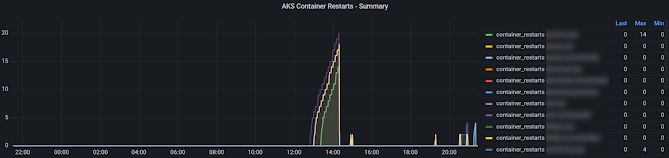
Container Restart Counts Grafana Chart with Azure Monitor for AKS

 We have disucussed pod restart Grafana panel in AKS in the post "Pod Restart Counts Grafana Chart with Azure Monitor for AKS". We can create similar panel for container restarts using managed Grafana in Azure for AKS using Azure monitor.

Expected Outcome

Panel similar to below showing contianer restarts for a applications over time with a table showing last container(s) of application restarts, maximum restarts for each application.


Saturday, 3 September 2022

Manually Push .NET App Docker Image to Azure Container Registry

 You might want to do quick test deploying your containers to AKS or Azure App Services, while development is ongoing. I fyou do not have a pipelines setup yet you may need to manually push your docker  images to Azure Contianer Registry (ACR). Let's have a look at the steps need to push a local image built to ACR using docker commands.

Saturday, 20 August 2022

Create Service Connection in Azure DevOps for Azure Container Registry - Using a Service Principal

Adding Azure Container Registry (ACR) service connection to Azure DevOps  is really simple as described in "Create Service Connection in Azure DevOps for Azure Container Registry", when you have the same account you are using for Azure DevOps, is associated with your Azure Subscription. However, this may not be the case always and you may want to push docker images to ACR in an Azure Subscription which is not related to your Azure DevOps organization, such as your customer's production Azure subscription. We have discussed one option with basic authentication in the post "Create Service Connection in Azure DevOps for Azure Container Registry - Using Basic Authentication". Let’s see how to create a service connection for ACR in such situation to utilize it in a deployment pipeline using a Service Principal in this post.

Tuesday, 16 August 2022

Create Service Connection in Azure DevOps for Azure Container Registry - Using Basic Authentication

Adding Azure Container Registry (ACR) service connection to Azure DevOps  is really simple as described in "Create Service Connection in Azure DevOps for Azure Container Registry", when you have the same account you are using for Azure DevOps, is associated with your Azure Subscription. However, this may not be the case always and you may want to push docker images to ACR in an Azure Subscription which is not related to your Azure DevOps organization, such as your customer's production Azure subscription. Let’s see how to create a service connection for ACR in such situation to utilize it in a deployment pipeline using basic authentication.

Saturday, 13 August 2022

Create Service Connection in Azure DevOps for Azure Container Registry

 To push docker contianer images from Azure Pipelines to Azure Container Registry (ACR) you need to establish a connection between the Azure DevOps Team Project and the Azure Continer Registry in the Azure Subscription. General service principal based Azure Resource Manager Service Connection cannot be used to push docker images to Azure Contianer Registry. We need to instead create a service connection of type docker registry in Azure DevOps. Let's look at few simple steps to get such service connction created.

It is simple to setup this service connection if your Azure subscription and the Azure DevOps belong to the same account as described in this post. If you have your Azure subscription account as a different account form your Azure DevOps account refer one of below options to create the service connectiont to ACR. 

Saturday, 6 August 2022

Kubernetes Pod Logs - View Latest Logs Faster

 We have discussed about enabling detailed request, resposnse logs in ASP.NET Core APIs in the post "Log All Requests in ASP.NET Core API". In a contianerinzed API running in a Kubernetes cluster, say AKS, you would be interested in reading these logs to debug some error or for quick monitoring on the requests made. Implementing a proper monitoring solution using ELK for Kubernetes is more useful, however, doing a quick look at logs of contianers/pods will help as well at times. When you run  kubectl logs podname-xxxxxxxxxx-xxxxxx -n k8snamesapce you will get the entire log of a particular pod. But depending on pod age it may be a long log and you might only be interested in couple of minutes or last hour details to have a quick look. Let's see how we can limit and read pod logs for a time frame or number of log lines.

Sunday, 6 January 2019

Deploying ASP.NET Core App to Azure Kubernetes Services (AKS)–Setting Up Azure DevOps Pipeline Manually–Step By Step Guide–Part 2

In the part 1 of this post, enabling Docker support for ASP.NET Core app and building and pushing the Docker image to Azure Container Service, using Azure DevOps build pipeline with simple steps was described. The image is tagged with the build Id and it is pushed to the Azure Container Registry, so that it can be later deployed to a container orchestrator to run the container. Helm is used to get he deployment done to AKS via Azure DevOps when creating a an ASP.NET Core App, Container Registry and AKS, then getting it deployed automatically with few clicks using Azure Projects as described in the post “Deploy ASP.NET Core App to AKS with Azure DevOps Project”. Let’s look at getting the container image in Azure Container Registry deployed to AKS with three simple steps without using Helm, with Azure Pipelines.

Saturday, 29 December 2018

Deploying ASP.NET Core App to Azure Kubernetes Services (AKS)–Setting Up Azure DevOps Pipeline Manually–Step By Step Guide–Part 1

In the post “Deploy ASP.NET Core App to AKS with Azure DevOps” a quick start guide has been given on setting up an ASP.NET Core App with Azure DevOps projects. The application code, Azure Container Registry, Azure Kubernetes Service (AKS) Cluster as well as build and deployment pipelines were auto generated, with few clicks in the Azure Portal. To do deployment to AKS, Helm packaging was used in the Azure DevOps Projects auto generated sample app. In this post, let’s look at much simpler implementation, to get the ASP.NET Core App build and deployed to AKS via Azure Pipelines.

Popular Posts