Expected Outcome
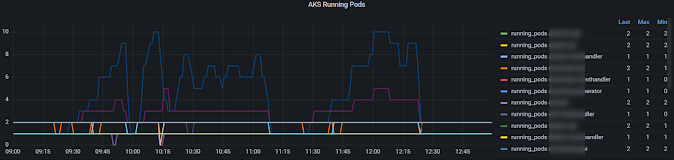
Each service actual scaling over time is shown as summary. This indicate based on load how each service in your application scale out based on the demanded by horizontal pod autoscaler.
Expected Outcome
Each service actual scaling over time is shown as summary. This indicate based on load how each service in your application scale out based on the demanded by horizontal pod autoscaler.
Executing unit tests and viewing results in unit tests in a build pipeline is essential to keep high quality in an application deployment via any pipeline system. GitHub actions are the way forward to implement pipelines with repositories in GitHub. Let's explore how to run unit tests and view results in GitHub actions workflow.
Importing a git repo to Azure DevOps Git is straight forward using the Azure DevOps portal. However, if the importing repo has large files with git lfs then the cloning of the repo after import fails due to the large files are not imported. Let's see how to get the large files fixed for the imported repo.
Using a YAML pipeline paramter in a PowerShell task is straight forward for types such as string. For example, if there is a YAML pipeline parameter named env of type string, we can read it in PowerShell task with $envName = '${{ parameters.env }}; without any issue. However, if the parameter is type of object we cannot read, the paramter the same way we do with string parameters. If we try to read object parameter named apps, $apps = '${{ parameters.apps}}; , there will be an YAML validation error staring the pipeline such as below.
/azure-pipelines.yml (Line: 57, Col: 23): Unable to convert from Array to String. Value: Array
Even if we try to use below it will be same issue.
[String[]]$apps = '${{ parameters.apps}};
[PSObject[]]$apps = '${{ parameters.apps}};
Let's explore the issueand solution in detail.
How to fnd SKU information for SQL databses is documented here. The command suggested to use is az sql db list-editions -l region -o table . This would provide available list of SQL database SKU optons to chose form for a given region. However, the headings and parameters required in bicep is bit confusing to figure out intially. Let's look at how to map values for available SKUs provided by az sql db list-editions -l region -o table command, and parmeters in Bicep SKU for SQL database.
Keyvault secrets can be used in Azure app conciguratoins and can be setup with terraform. However, if the secret is modified then modified secret reference is not get updated to the app configuration. There are two ways to fix this issue in terraform. Let's explore them.
Azure DevOps use service principals (SPN or Azure AD app registration) to make a service connection to Azure to be able to run Terraform or other IaC based resource deployments targeting Azure. You may run into issue while trying to read another Azure AD app registration information, within terraform. For example consider below code segment.
To apply Azure App Configurations including key vault secrets reference key values and normal key values, using a single file requires to use KVSet file as described in the Article here. With Azure pipelines updating the app config values require, two seperate files to be used in default mode to update, app configs for non secrets and secrets. However, developers of .NET applications would prefer to keep the appsettings file for keeping configurations for development purpose, rather than keeping seperate file to keep references to secret key values. Therefore, in Azure pipline implmentation, it would be required to generate a KVSet file using an app setting file.


