Friday, 17 March 2023

Container Restart Counts Grafana Chart with Azure Monitor for AKS

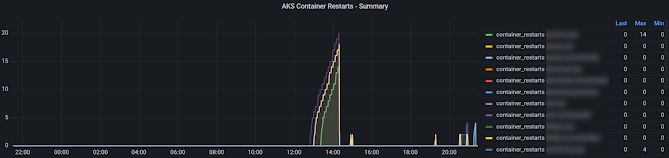
 We have disucussed pod restart Grafana panel in AKS in the post "Pod Restart Counts Grafana Chart with Azure Monitor for AKS". We can create similar panel for container restarts using managed Grafana in Azure for AKS using Azure monitor.

Expected Outcome

Panel similar to below showing contianer restarts for a applications over time with a table showing last container(s) of application restarts, maximum restarts for each application.

Saturday, 4 March 2023

Pod Restart Counts Grafana Chart with Azure Monitor for AKS

 If your pods are often restarting it might indicate a problem you might have in your application deployed to AKS. For example, there was some significant number of restarts seen in .NET 3.1 applications deployed to AKS (reason found as .NET 3.1 issue which is supposedly fixed in .NET 5, so the approach to fix was to update the applications to .NET 6), which were only appearing in development and in staging envronments, while QA environment haven't shown a single restart. Threfore, it is important to monitor the restart counts in pods to identify issues you might not see in development or QA envronements, but may occur in production environments. Let's see how we can create a pod restart count panel in managed Grafana in Azure for AKS using Azure monitor.

Monday, 27 February 2023

Pod Counts Grafana Chart with Azure Monitor for AKS

 We have discussed how to create a Grafana panel for view Horizontal Pod Autoscaler (HPA) desired pod counts in AKS (Azure Kubernetes Services) in the post "Horizontal Pod Autoscaler Desired Replica Count Grafana Chart with Azure Monitor for AKS". As desired count is changing in HPA for an app monitoring how the actual pod count is changing would be really useful insights. Let's look at steps required to implement Grafana chart for actual pod counts over time using Azure monitor fror AKS.

Monday, 20 February 2023

Horizontal Pod Autoscaler Desired Replica Count Grafana Chart with Azure Monitor for AKS

 Horizontal Pod Autoscaler (HPA) in Kubernetes manage the number of instances for each pod deployment based on the scale settings specified. Itw would be good insights to monitor the demand for scaling of each pod. as a prerequicite we need to setup monitoring AKS cluster with Managed Grafana in Azure with Azure Monitor and Log Analytics Workspace Let's see how we can create a Grafana pannel to monitor the HPA behaviour over time.

Thursday, 16 February 2023

Creating AKS Node Count Grafana Panel with Azure Monitor

 AKS can be setup with automatic node scaling using VM scalesets in node pools. It will be useful to monitor how the nodes are scaling over time to have  a good insights, in to the AKS cluster nodes behaviour, while applications deployed in the cluster getting heavy traffic. We can enable monitoring AKS cluster with Managed Grafana in Azure with Azure Monitor and Log Analytics Workspace.  Let's look at query to setup node count over time panel in Managed Grafana in Azure using Azure Monitor.

Tuesday, 7 February 2023

Set Value for a Secret Variable in Azure Release Pipelines while Triggering from Another Release

 You might want to trigger a release from another release pipeline, specially if you are deploying to a multi tenant application environment. In such cases when you trigger a pipeline from another pipeline the variables you are setting dynamically cannot be a secret variable. If you set a variable that should be settable at release time as a secret, the release cannot be triggerd via the Azure DevOps REST API call, as it will throw an exception such as below.

The 'secret' property of
variables cannot be altered while creating a release. Verify the value
provided for variables UserPwd at scope Release and try again.  

Let's try to understand bit more of the requirement.

Saturday, 17 December 2022

Resolve "encountered an error during hcsshim::System::CreateProcess: failure in a Windows system call: The system cannot find the file specified. (0x2)"

 As discussed in the post "Run .NET Core 3.1 Application with Windows Server Core 2019 Docker Image" there could be situations you need to setup .NET Core 3.1 on Windows servercore docker image. However, you might have experienced below error running Windows container, when you setup tools such as .NET runtime by yourself using dockerfile. 


Let's see one such example case and how it can be fixed with .NET Core runtime 3.1 installed on Windows servercore docker image.

Sunday, 4 December 2022

Run .NET Core 3.1 Application with Windows Server Core 2019 Docker Image

 You would love to run your .NET applications as Linux containers instead of using Windows containers.  However, there are situations that you have to run your .NET applications as Windows containers with servercore docker image due to your project having dependencies, such as a third party dll (could be even built by different department in your company) which demands your application to run on Windows servercore docker image. Worst case is sometimes your app is still on .NET 3.1 Core you do not have a servercore image for .NET Core 3.1. (For .NET 5,6,7,8 the Windows servercore images are available.. check here)  Therefore you need to setup .NET Core 3.1 runtime on the servercore docker image. Let's see how we can achive this requirement.

Popular Posts